P02-项目实现

一、项目架构与代码架构图【掌握】

1 项目架构图

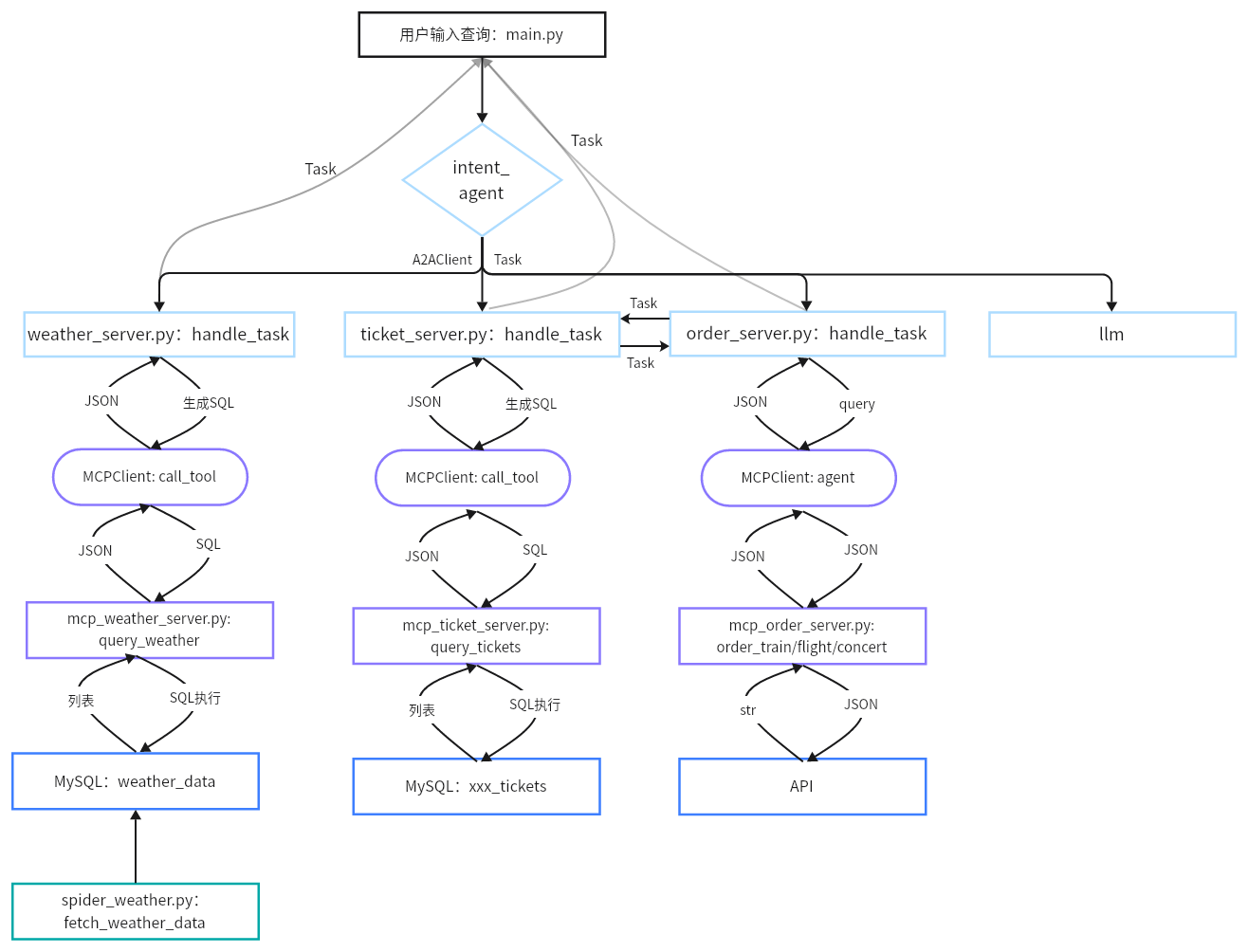
SmartVoyage 是基于A2A与MCP协议实现是一个多agent系统。系统包括 LLM 路由服务器(意图识别)、天气代理服务器(查询天气数据库)、票务代理服务器(查询票务数据库)、票务预定服务器(API接口)、MCP 工具服务器(数据库接口)、数据采集脚本和 Streamlit 前端客户端。

image-20251030184608544

2 代码架构图

以下是代码层面的架构图。

image-20251030184548834

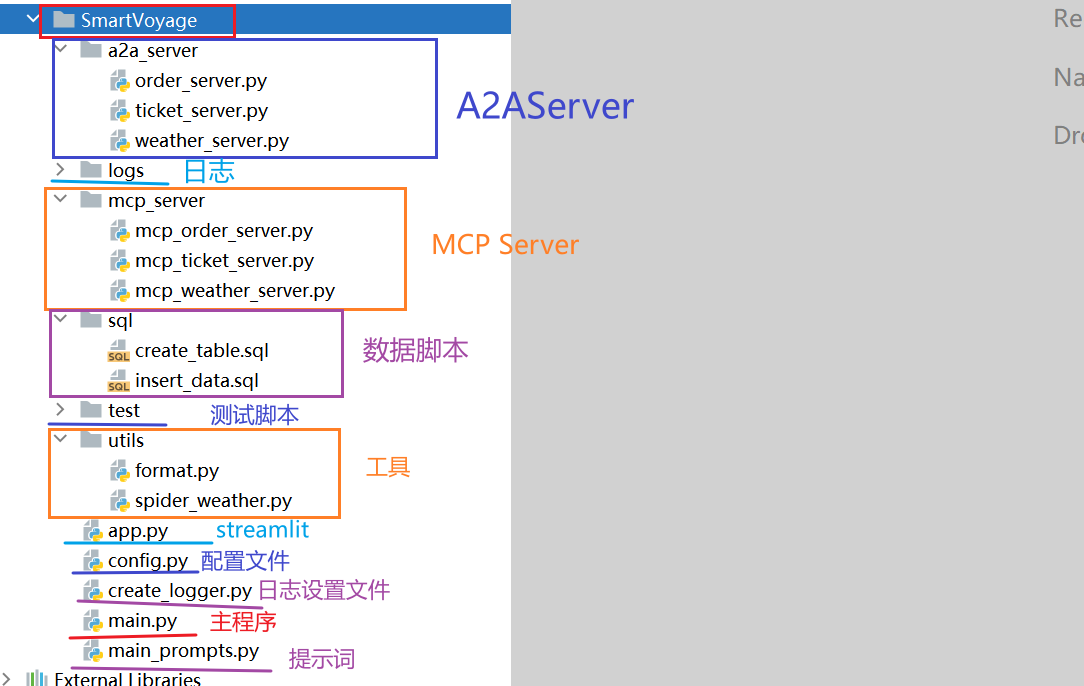
代码结构如下:

image-20251030183225685

二、项目实现

1 整体流程【熟悉】

  1. 配置基础环境(config.py 和 create_logger.py)
  2. 初始化数据库(SQL 脚本)
  3. 采集数据(spider_weather.py)
  4. 完成 MCP 服务器(mcp_weather_server.py 、mcp_ticket_server.py 和 mcp_order_server.py)
  5. 完成A2A代理服务器(weather_server.py 、ticket_server.py 和 order_server.py)
  6. 完成客户端(main.py)
  7. 启动服务进行联调
    • 启动MCP 服务器(mcp_weather_server.py 、mcp_ticket_server.py 和 mcp_order_server.py)
    • 启动代理服务器(weather_server.py 、ticket_server.py 和 order_server.py)
    • 启动客户端(main.py)

2 配置模块【实现】

2.1 config.py

位置:SmartVoyage/config.py

1
2
3
4
5
6
7
8
9
10
11
12
13
14
15
16
17
18
19
20
21
22
23
24
25
26
import os

# 项目根目录
project_root = os.path.join(os.path.dirname(os.path.abspath(__file__)), '..')


#定义配置文件
class Config:
def __init__(self):
# 大模型配置
self.base_url = 'https://dashscope.aliyuncs.com/compatible-mode/v1'
self.api_key = 'sk-67320312aa3e4fsdfsss3411aa0d7'
self.model_name = 'qwen-plus'

# 数据库配置
self.host = 'localhost'
self.user = 'root'
self.password = 'root'
self.database = 'travel_rag'

# 日志配置
self.log_file = os.path.join(project_root, 'SmartVoyage', 'logs/app.log')


if __name__ == '__main__':
print(Config().log_file)

2.2 create_logger.py

位置:SmartVoyage/create_logger.py

1
2
3
4
5
6
7
8
9
10
11
12
13
14
15
16
17
18
19
20
21
22
23
24
25
26
27
28
29
30
31
32
33
34
35
36
37
import logging
import os

from SmartVoyage.config import Config


def setup_logger(name, log_file='logs/app.log'):
# 创建日志文件夹
os.makedirs(os.path.dirname(log_file), exist_ok=True)

# 获取日志记录器
logger = logging.getLogger(name)
logger.setLevel(logging.DEBUG)
# 防止重复输出的关键!
logger.propagate = False

# 定义日志格式
formatter = logging.Formatter('%(name)s - %(asctime)s - %(levelname)s - %(message)s')

# 创建控制台处理器
console_handler = logging.StreamHandler()
console_handler.setFormatter(formatter)
console_handler.setLevel(logging.INFO) # 每个日志处理器可以单独设置日志级别,但是这个日志级别必须高于或等于处理器级别

# 创建文件处理器
file_handler = logging.FileHandler(filename=log_file, encoding="utf-8", mode="a")
file_handler.setFormatter(formatter)
file_handler.setLevel(logging.DEBUG)

# 将处理器添加到日志记录器中
if not logger.handlers: # 先进行判断,再进行添加。避免重复添加处理器
logger.addHandler(console_handler)
logger.addHandler(file_handler)

return logger

logger = setup_logger('SmartVoage', Config().log_file)

3 数据库初始化【实现】

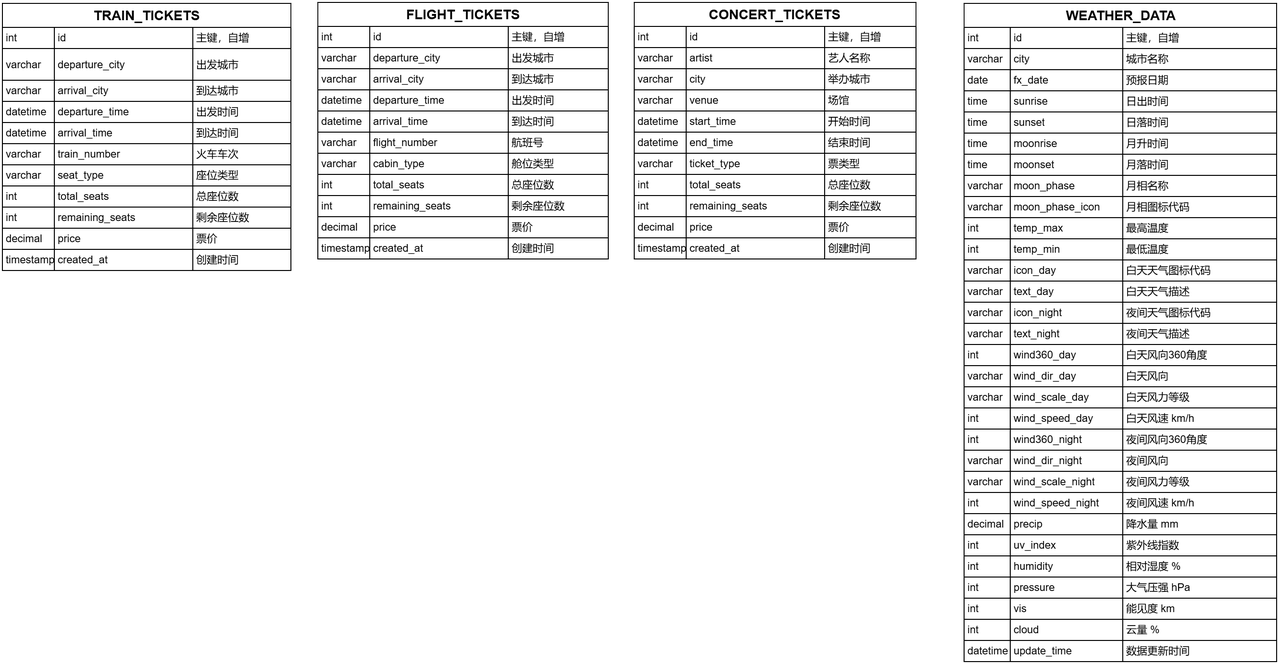
SQL 脚本,创建票务和天气数据库表。定义数据结构,确保 MCP 服务器能查询存储的数据。

项目中的定位:数据基础,存储天气和票务信息。

核心功能:创建表、设置唯一键和注释。

数据库概述:

  • 数据库名称:travel_rag

  • 字符集:utf8mb4(支持中文等复杂字符)

  • 校对规则:utf8mb4_unicode_ci(大小写不敏感,适合多语言)

  • 作用:存储票务数据(火车票、机票、演唱会票),供 mcp_ticket_server.py 查询,支持 ticket_server.py 的票务查询功能。存储天气数据,供mcp_weather_server.py查询,支持weather_server.py天气查询功能。
4 数据采集【实现】

spider_weather天气数据采集脚本,从 API 获取数据,写入 MySQL。保持数据库实时更新,支持代理查询。数据采集地址:https://dev.qweather.com/docs/api/weather/weather-daily-forecast/

项目中的定位:后台数据源,定时执行。

核心功能:API 请求、数据解析、写入/更新数据库、调度。

**代码路径:**SmartVoyage/sql

5 数据导入【实现】

5.1 导包及配置

以下配置是关于天气API配置以及数据库配置,通过爬虫爬取天气信息网站存储到数据库用于作为A2A检索数据库。

位置:SmartVoyage/utils/spider_weather.py

1
2
3
4
5
6
7
8
9
10
11
12
13
14
15
16
17
18
19
20
21
22
23
24
25
26
27
28
import requests
import mysql.connector
from datetime import datetime, timedelta
import schedule
import time
import json
import gzip
import pytz

# 配置
API_KEY = "5ef0a4×××××××××317eae83"
city_codes = {
"北京": "101010100",
"上海": "101020100",
"广州": "101280101",
"深圳": "101280601"
}
BASE_URL = "https://m7487r6ych.re.qweatherapi.com/v7/weather/30d"
TZ = pytz.timezone('Asia/Shanghai') # 使用上海时区

# MySQL 配置
db_config = {
"host": "localhost",
"user": "root",
"password": "root",
"database": "travel_rag",
"charset": "utf8mb4"
}

5.2 连接数据库

connect_db函数

目标:建立 MySQL 数据库连接。

功能:使用 db_config 配置连接 MySQL,返回连接对象

输入输出

输入:无。

输出:mysql.connector.connection.MySQLConnection 对象。

1
2
def connect_db():
return mysql.connector.connect(**db_config)

测试:

1
2
3
4
5
if __name__ == '__main__':
conn = connect_db()
print(conn.is_connected())
print("数据库连接成功!")
conn.close()

5.3 爬取数据

fetch_weather_data函数用于天气数据的爬取与解析。

目标:从和风天气 API 获取 30 天天气预报数据。

功能:发送 GET 请求,处理 gzip 压缩,解析 JSON 返回数据。

输入输出

输入:city(字符串,如“北京”),location(字符串,如“101010100”)。

输出:JSON 字典(包含 daily 预报列表)或 None。

1
2
3
4
5
6
7
8
9
10
11
12
13
14
15
16
17
18
19
20
21
22
23
def fetch_weather_data(city, location):
headers = {
"X-QW-Api-Key": API_KEY,
"Accept-Encoding": "gzip"
}
url = f"{BASE_URL}?location={location}"
try:
response = requests.get(url, headers=headers, timeout=10)
response.raise_for_status()
if response.headers.get('Content-Encoding') == 'gzip':
data = gzip.decompress(response.content).decode('utf-8')
else:
data = response.text
return json.loads(data)
except requests.RequestException as e:
print(f"请求 {city} 天气数据失败: {e}")
return None
except json.JSONDecodeError as e:
print(f"{city} JSON 解析错误: {e}, 响应内容: {response.text[:500]}...")
return None
except gzip.BadGzipFile:
print(f"{city} 数据未正确解压,尝试直接解析: {response.text[:500]}...")
return json.loads(response.text) if response.text else None

测试:

1
2
3
4
if __name__ == "__main__":
weather_data = fetch_weather_data("北京", city_codes["北京"])
print(weather_data)
print("解析成功!")

5.4 查询数据更新时间

get_latest_update_time函数

目标:查询数据库中指定城市的最新更新时间。

功能:执行 SQL 查询,返回 weather_data 表中 city 的最新 update_time。

输入输出

输入:cursor(MySQL 游标),city(字符串,如“北京”)。

输出:datetime 对象或 None。

1
2
3
4
def get_latest_update_time(cursor, city):
cursor.execute("SELECT MAX(update_time) FROM weather_data WHERE city = %s", (city,))
result = cursor.fetchone()
return result[0] if result[0] else None

测试:

1
2
3
4
5
6
7
8
9
10
11
if __name__ == "__main__":
# 建立数据库连接
conn = connect_db()
cursor = conn.cursor()

# 获取北京城市的最新更新的时间日期
print(get_latest_update_time(cursor, '北京'))

# 关闭数据库连接
cursor.close()
conn.close()

5.5 是否需要更新

should_update_data函数

目标:判断是否需要更新城市天气数据。

功能:检查最新更新时间是否超过 1 天,或强制更新。

输入输出

输入:latest_time(datetime 或 None),force_update(布尔值)。

输出:布尔值(True/False)。

1
2
3
4
5
6
7
8
9
10
11
12
def should_update_data(latest_time, force_update=False):
if force_update:
return True
if latest_time is None:
return True

# 时区问题:确保 latest_time 有时区信息
if latest_time and latest_time.tzinfo is None:
latest_time = latest_time.replace(tzinfo=TZ)

current_time = datetime.now(TZ)
return (current_time - latest_time) > timedelta(days=1)

测试:

1
2
3
4
5
6
7
8
9
10
11
12
13
14
15
16
17
18
19
if __name__ == "__main__":
from datetime import datetime, timedelta
import pytz

# 设置时区
TZ = pytz.timezone('Asia/Shanghai')

# 模拟一个2天前的更新时间
latest = datetime.now(TZ) - timedelta(days=2)
print("========模拟一个两天前的时间==============")
print(latest)
# 测试是否需要更新数据
print(should_update_data(latest))

# 根据更新判断结果输出相应信息
if should_update_data(latest):
print(f"需要更新数据,上次更新时间:{latest}")
else:
print("没有数据,需要更新数据!")

5.6 存储数据

store_weather_data函数

目标:写入或更新天气预报数据到数据库。

功能:循环预报数据,使用 INSERT ON DUPLICATE KEY UPDATE 插入/更新 weather_data 表。

输入输出

输入:数据库连接、mysql游标,城市、数据。

输出:无,数据库更新。

1
2
3
4
5
6
7
8
9
10
11
12
13
14
15
16
17
18
19
20
21
22
23
24
25
26
27
28
29
30
31
32
33
34
35
36
37
38
39
40
41
42
43
44
45
46
47
48
49
50
51
52
53
def store_weather_data(conn, cursor, city, data):
if not data or data.get("code") != "200":
print(f"{city} 数据无效,跳过存储。")
return

daily_data = data.get("daily", [])
update_time = datetime.fromisoformat(data.get("updateTime").replace("+08:00", "+08:00")).replace(tzinfo=TZ)

for day in daily_data:
fx_date = datetime.strptime(day["fxDate"], "%Y-%m-%d").date()
values = (
city, fx_date,
day.get("sunrise"), day.get("sunset"),
day.get("moonrise"), day.get("moonset"),
day.get("moonPhase"), day.get("moonPhaseIcon"),
day.get("tempMax"), day.get("tempMin"),
day.get("iconDay"), day.get("textDay"),
day.get("iconNight"), day.get("textNight"),
day.get("wind360Day"), day.get("windDirDay"), day.get("windScaleDay"), day.get("windSpeedDay"),
day.get("wind360Night"), day.get("windDirNight"), day.get("windScaleNight"), day.get("windSpeedNight"),
day.get("precip"), day.get("uvIndex"),
day.get("humidity"), day.get("pressure"),
day.get("vis"), day.get("cloud"),
update_time
)
insert_query = """
INSERT INTO weather_data (
city, fx_date, sunrise, sunset, moonrise, moonset, moon_phase, moon_phase_icon,
temp_max, temp_min, icon_day, text_day, icon_night, text_night,
wind360_day, wind_dir_day, wind_scale_day, wind_speed_day,
wind360_night, wind_dir_night, wind_scale_night, wind_speed_night,
precip, uv_index, humidity, pressure, vis, cloud, update_time
) VALUES (%s, %s, %s, %s, %s, %s, %s, %s, %s, %s, %s, %s, %s, %s, %s, %s, %s, %s, %s, %s, %s, %s, %s, %s, %s, %s, %s, %s, %s)
ON DUPLICATE KEY UPDATE
sunrise = VALUES(sunrise), sunset = VALUES(sunset), moonrise = VALUES(moonrise),
moonset = VALUES(moonset), moon_phase = VALUES(moon_phase), moon_phase_icon = VALUES(moon_phase_icon),
temp_max = VALUES(temp_max), temp_min = VALUES(temp_min), icon_day = VALUES(icon_day),
text_day = VALUES(text_day), icon_night = VALUES(icon_night), text_night = VALUES(text_night),
wind360_day = VALUES(wind360_day), wind_dir_day = VALUES(wind_dir_day), wind_scale_day = VALUES(wind_scale_day),
wind_speed_day = VALUES(wind_speed_day), wind360_night = VALUES(wind360_night),
wind_dir_night = VALUES(wind_dir_night), wind_scale_night = VALUES(wind_scale_night),
wind_speed_night = VALUES(wind_speed_night), precip = VALUES(precip), uv_index = VALUES(uv_index),
humidity = VALUES(humidity), pressure = VALUES(pressure), vis = VALUES(vis),
cloud = VALUES(cloud), update_time = VALUES(update_time)
"""
try:
cursor.execute(insert_query, values)
print(f"{city} {fx_date} 数据写入/更新成功: {day.get('textDay')}, 影响行数: {cursor.rowcount}")
except mysql.connector.Error as e:
print(f"{city} {fx_date} 数据库错误: {e}")

conn.commit()
print(f"{city} 事务提交完成。")

测试:

1
2
3
4
5
6
if __name__ == "__main__":
conn = connect_db()
cursor = conn.cursor()
data = fetch_weather_data("北京", "101010100")
store_weather_data(conn, cursor, "北京", data)
print("数据存储完成。")

5.7 更新数据

update_weather函数

目标:更新所有城市数据。

功能:查看是否满足更新条件,调用数据存储与数据爬取。

输入输出:

输入:更新条件

输出:无,数据库更新。

1
2
3
4
5
6
7
8
9
10
11
12
13
14
15
16
def update_weather(force_update=False):
conn = connect_db()
cursor = conn.cursor()

for city, location in city_codes.items():
latest_time = get_latest_update_time(cursor, city)
if should_update_data(latest_time, force_update):
print(f"开始更新 {city} 天气数据...")
data = fetch_weather_data(city, location)
if data:
store_weather_data(conn, cursor, city, data)
else:
print(f"{city} 数据已为最新,无需更新。最新更新时间: {latest_time}")

cursor.close()
conn.close()

测试:

1
2
if __name__ == "__main__":
update_weather(force_update=True)

5.8 定时更新

setup_scheduler函数

目标:设置定时任务,每天在 PDT 16:00(北京时间 01:00)调用 update_weather 函数。保证数据的实时性。

功能

使用 schedule 库注册每日任务。

进入无限循环,检查并运行待执行任务,每 60 秒检查一次。

项目中的定位:确保天气数据定时更新,保持 weather_data 表的数据新鲜,支持 weather_server.py 和 mcp_weather_server.py 查询。

1
2
3
4
5
6
def setup_scheduler():
# 北京时间 1:00 对应 PDT 前一天的 16:00(夏令时)
schedule.every().day.at("16:00").do(update_weather)
while True:
schedule.run_pending()
time.sleep(60)

原理测试:

1
2
3
4
5
6
7
8
9
10
11
12
13
14
15
16
17
18
19
from datetime import datetime, timedelta
import time
import schedule

now = datetime.now()
trigger_time = (now + timedelta(seconds=20)).strftime("%H:%M:%S")

print(f"[测试日志] 当前时间: {now}")
print(f"[测试日志] 设置任务在 {trigger_time} 触发 update_weather")

# 使用 lambda 延迟执行
schedule.every().day.at(trigger_time).do(lambda: print("任务已触发!"))

# 运行 30 秒以观察任务触发
end_time = now + timedelta(seconds=60)
while datetime.now() < end_time:
schedule.run_pending()
print(f"[测试日志] 检查待执行任务: {datetime.now()}")
time.sleep(1)

5.9 完整代码

位置:SmartVoyage/utils/spider_weather.py

1
2
3
4
5
6
7
8
9
10
11
12
13
14
15
16
17
18
19
20
21
22
23
24
25
26
27
28
29
30
31
32
33
34
35
36
37
38
39
40
41
42
43
44
45
46
47
48
49
50
51
52
53
54
55
56
57
58
59
60
61
62
63
64
65
66
67
68
69
70
71
72
73
74
75
76
77
78
79
80
81
82
83
84
85
86
87
88
89
90
91
92
93
94
95
96
97
98
99
100
101
102
103
104
105
106
107
108
109
110
111
112
113
114
115
116
117
118
119
120
121
122
123
124
125
126
127
128
129
130
131
132
133
134
135
136
137
138
139
140
141
142
143
144
145
146
147
148
149
150
151
152
153
154
155
156
157
158
159
160
161
162
163
164
165
166
167
168
169
170
171
172
173
174
175
176
177
178
179
180
181
182
183
184
185
186
187
188
189
190
191
192
193
194
import requests
import mysql.connector
from datetime import datetime, timedelta
import schedule
import time
import json
import gzip
import pytz

# 配置
API_KEY = "5ef0a47e161a4ea997227322317eae83"
city_codes = {
"北京": "101010100",
"上海": "101020100",
"广州": "101280101",
"深圳": "101280601"
}
BASE_URL = "https://m7487r6ych.re.qweatherapi.com/v7/weather/30d"
TZ = pytz.timezone('Asia/Shanghai') # 使用上海时区

# MySQL 配置
db_config = {
"host": "localhost",
"user": "root",
"password": "123456",
"database": "travel_rag",
"charset": "utf8mb4"
}

def connect_db():
return mysql.connector.connect(**db_config)

def fetch_weather_data(city, location):
headers = {
"X-QW-Api-Key": API_KEY,
"Accept-Encoding": "gzip"
}
url = f"{BASE_URL}?location={location}"
try:
response = requests.get(url, headers=headers, timeout=10)
response.raise_for_status()
if response.headers.get('Content-Encoding') == 'gzip':
data = gzip.decompress(response.content).decode('utf-8')
else:
data = response.text
return json.loads(data)
except requests.RequestException as e:
print(f"请求 {city} 天气数据失败: {e}")
return None
except json.JSONDecodeError as e:
print(f"{city} JSON 解析错误: {e}, 响应内容: {response.text[:500]}...")
return None
except gzip.BadGzipFile:
print(f"{city} 数据未正确解压,尝试直接解析: {response.text[:500]}...")
return json.loads(response.text) if response.text else None

def get_latest_update_time(cursor, city):
cursor.execute("SELECT MAX(update_time) FROM weather_data WHERE city = %s", (city,))
result = cursor.fetchone()
return result[0] if result[0] else None

def should_update_data(latest_time, force_update=False):
if force_update:
return True
if not latest_time:
return True
current_time = datetime.now(TZ)
latest_time = latest_time.replace(tzinfo=TZ)
return (current_time - latest_time).total_seconds() / 3600 >= 24

def store_weather_data(conn, cursor, city, data):
if not data or data.get("code") != "200":
print(f"{city} 数据无效,跳过存储。")
return

daily_data = data.get("daily", [])
update_time = datetime.fromisoformat(data.get("updateTime").replace("+08:00", "+08:00")).replace(tzinfo=TZ)

for day in daily_data:
fx_date = datetime.strptime(day["fxDate"], "%Y-%m-%d").date()
values = (
city, fx_date,
day.get("sunrise"), day.get("sunset"),
day.get("moonrise"), day.get("moonset"),
day.get("moonPhase"), day.get("moonPhaseIcon"),
day.get("tempMax"), day.get("tempMin"),
day.get("iconDay"), day.get("textDay"),
day.get("iconNight"), day.get("textNight"),
day.get("wind360Day"), day.get("windDirDay"), day.get("windScaleDay"), day.get("windSpeedDay"),
day.get("wind360Night"), day.get("windDirNight"), day.get("windScaleNight"), day.get("windSpeedNight"),
day.get("precip"), day.get("uvIndex"),
day.get("humidity"), day.get("pressure"),
day.get("vis"), day.get("cloud"),
update_time
)
insert_query = """
INSERT INTO weather_data (
city, fx_date, sunrise, sunset, moonrise, moonset, moon_phase, moon_phase_icon,
temp_max, temp_min, icon_day, text_day, icon_night, text_night,
wind360_day, wind_dir_day, wind_scale_day, wind_speed_day,
wind360_night, wind_dir_night, wind_scale_night, wind_speed_night,
precip, uv_index, humidity, pressure, vis, cloud, update_time
) VALUES (%s, %s, %s, %s, %s, %s, %s, %s, %s, %s, %s, %s, %s, %s, %s, %s, %s, %s, %s, %s, %s, %s, %s, %s, %s, %s, %s, %s, %s)
ON DUPLICATE KEY UPDATE
sunrise = VALUES(sunrise), sunset = VALUES(sunset), moonrise = VALUES(moonrise),
moonset = VALUES(moonset), moon_phase = VALUES(moon_phase), moon_phase_icon = VALUES(moon_phase_icon),
temp_max = VALUES(temp_max), temp_min = VALUES(temp_min), icon_day = VALUES(icon_day),
text_day = VALUES(text_day), icon_night = VALUES(icon_night), text_night = VALUES(text_night),
wind360_day = VALUES(wind360_day), wind_dir_day = VALUES(wind_dir_day), wind_scale_day = VALUES(wind_scale_day),
wind_speed_day = VALUES(wind_speed_day), wind360_night = VALUES(wind360_night),
wind_dir_night = VALUES(wind_dir_night), wind_scale_night = VALUES(wind_scale_night),
wind_speed_night = VALUES(wind_speed_night), precip = VALUES(precip), uv_index = VALUES(uv_index),
humidity = VALUES(humidity), pressure = VALUES(pressure), vis = VALUES(vis),
cloud = VALUES(cloud), update_time = VALUES(update_time)
"""
try:
cursor.execute(insert_query, values)
print(f"{city} {fx_date} 数据插入/更新成功: {day.get('textDay')}, 影响行数: {cursor.rowcount}")
except mysql.connector.Error as e:
print(f"{city} {fx_date} 数据库错误: {e}")

conn.commit()
print(f"{city} 事务提交完成。")

def update_weather(force_update=False):
conn = connect_db()
cursor = conn.cursor()

for city, location in city_codes.items():
latest_time = get_latest_update_time(cursor, city)
if should_update_data(latest_time, force_update):
print(f"开始更新 {city} 天气数据...")
data = fetch_weather_data(city, location)
if data:
store_weather_data(conn, cursor, city, data)
else:
print(f"{city} 数据已为最新,无需更新。最新更新时间: {latest_time}")

cursor.close()
conn.close()

def setup_scheduler():
# 北京时间 1:00 对应 PDT 前一天的 16:00(夏令时)
schedule.every().day.at("16:00").do(update_weather)
while True:
schedule.run_pending()
time.sleep(60)

if __name__ == "__main__":
# 初始检查和更新
with mysql.connector.connect(**db_config) as conn:
cursor = conn.cursor()
cursor.execute("""
CREATE TABLE IF NOT EXISTS weather_data (
id INT AUTO_INCREMENT PRIMARY KEY,
city VARCHAR(50) NOT NULL COMMENT '城市名称',
fx_date DATE NOT NULL COMMENT '预报日期',
sunrise TIME COMMENT '日出时间',
sunset TIME COMMENT '日落时间',
moonrise TIME COMMENT '月升时间',
moonset TIME COMMENT '月落时间',
moon_phase VARCHAR(20) COMMENT '月相名称',
moon_phase_icon VARCHAR(10) COMMENT '月相图标代码',
temp_max INT COMMENT '最高温度',
temp_min INT COMMENT '最低温度',
icon_day VARCHAR(10) COMMENT '白天天气图标代码',
text_day VARCHAR(20) COMMENT '白天天气描述',
icon_night VARCHAR(10) COMMENT '夜间天气图标代码',
text_night VARCHAR(20) COMMENT '夜间天气描述',
wind360_day INT COMMENT '白天风向360角度',
wind_dir_day VARCHAR(20) COMMENT '白天风向',
wind_scale_day VARCHAR(10) COMMENT '白天风力等级',
wind_speed_day INT COMMENT '白天风速 (km/h)',
wind360_night INT COMMENT '夜间风向360角度',
wind_dir_night VARCHAR(20) COMMENT '夜间风向',
wind_scale_night VARCHAR(10) COMMENT '夜间风力等级',
wind_speed_night INT COMMENT '夜间风速 (km/h)',
precip DECIMAL(5,1) COMMENT '降水量 (mm)',
uv_index INT COMMENT '紫外线指数',
humidity INT COMMENT '相对湿度 (%)',
pressure INT COMMENT '大气压强 (hPa)',
vis INT COMMENT '能见度 (km)',
cloud INT COMMENT '云量 (%)',
update_time DATETIME COMMENT '数据更新时间',
UNIQUE KEY unique_city_date (city, fx_date)
) ENGINE=InnoDB DEFAULT CHARSET=utf8mb4 COLLATE=utf8mb4_unicode_ci COMMENT='天气数据表'
""")
conn.commit()

# 立即执行一次更新
update_weather()

# 启动定时任务
setup_scheduler()

6 天气MCP服务器【掌握】

mcp_ticket_server.py:票务 MCP 服务器,提供 train_tickets、flight_tickets 和 concert_tickets 表的 SELECT 查询接口,返回 JSON 格式结果。

核心功能

  • 初始化 MySQL 数据库连接。
  • 执行 SELECT 查询,返回 JSON 格式结果。
  • 格式化日期和数值字段,确保 JSON 序列化兼容。
  • 通过 FastAPI 提供 HTTP 接口,响应 MCP 工具调用。

位置:SmartVoyage/mcp_server/mcp_weather_server.py

1
2
3
4
5
6
7
8
9
10
11
12
13
14
15
16
17
18
19
20
21
22
23
24
25
26
27
28
29
30
31
32
33
34
35
36
37
38
39
40
41
42
43
44
45
46
47
48
49
50
51
52
53
54
55
56
57
58
59
60
61
62
63
64
65
66
67
68
69
70
71
72
73
74
75
76
77
78
79
80
81
82
83
84
85
86
87
import mysql.connector
import json
from datetime import date, datetime, timedelta
from decimal import Decimal
from mcp.server.fastmcp import FastMCP

from SmartVoyage.config import Config
from SmartVoyage.create_logger import logger
from SmartVoyage.utils.format import DateEncoder, default_encoder

conf = Config()

# 天气服务类
class WeatherService: # 定义天气服务类,封装数据库操作逻辑
def __init__(self):
# 连接数据库
self.conn = mysql.connector.connect(
host=conf.host,
user=conf.user,
password=conf.password,
database=conf.database
)

# 具体的查询方法:输出一个SQL字符串,输入一个格式化的json字符串
def execute_query(self, sql: str) -> str:
try:
# 执行sql,获取数据
cursor = self.conn.cursor(dictionary=True)
cursor.execute(sql)
results = cursor.fetchall()
cursor.close()

# 格式化结果
# print(f'results-->{results}')
for result in results: # 遍历每个结果字典
for key, value in result.items():
if isinstance(value, (date, datetime, timedelta, Decimal)): # 检查值是否为特殊类型
result[key] = default_encoder(value) # 使用自定义编码器格式化该值
# 序列化为JSON,如果有结果返回success,否则no_data;使用DateEncoder,非ASCII不转义
return json.dumps({"status": "success", "data": results} if results else {"status": "no_data",
"message": "未找到天气数据,请确认城市和日期。"},
cls=DateEncoder, ensure_ascii=False)

except Exception as e:
logger.error(f'查询失败:{e}')
# 返回错误JSON响应
return json.dumps({"status": "error", "message": str(e)}, ensure_ascii=False)


# 创建天气MCP服务器
def create_weather_mcp_server():
# 创建FastMCP实例
weather_mcp = FastMCP(name="WeatherTools",
instructions="天气查询工具,基于 weather_data 表。",
log_level="ERROR",
host="127.0.0.1", port=8002)

# 创建工具
service = WeatherService()

@weather_mcp.tool(
name="query_weather",
description="查询天气数据,输入 SQL,如 'SELECT * FROM weather_data WHERE city = \"北京\" AND fx_date = \"2025-07-30\"'"
)
def query_weather(sql: str) -> str:
logger.info(f"执行天气查询: {sql}")
return service.execute_query(sql)

# 打印服务器信息
logger.info("=== 天气MCP服务器信息 ===")
logger.info(f"名称: {weather_mcp.name}")
logger.info(f"描述: {weather_mcp.instructions}")

# 运行服务器
try:
print("服务器已启动,请访问 http://127.0.0.1:8002/mcp")
weather_mcp.run(transport="streamable-http") # 使用 streamable-http 传输方式
except Exception as e:
print(f"服务器启动失败: {e}")


if __name__ == '__main__':
# service = WeatherService()
# sql = "SELECT * FROM weather_data WHERE city='上海' limit 2"
# print(service.execute_query(sql))

create_weather_mcp_server()

7 票务MCP 服务器【掌握】

mcp_weather_server天气 MCP 服务器,提供 weather_data 表的 SELECT 查询接口,返回 JSON 格式结果。

核心功能

  • 初始化 MySQL 数据库连接。

  • 执行 SELECT 查询,返回 JSON 格式结果。

  • 格式化日期和数值字段,确保 JSON 序列化兼容。

  • 通过 FastAPI 提供 HTTP 接口,响应 MCP 工具调用。

位置:SmartVoyage/mcp_server/mcp_ticket_server.py

1
2
3
4
5
6
7
8
9
10
11
12
13
14
15
16
17
18
19
20
21
22
23
24
25
26
27
28
29
30
31
32
33
34
35
36
37
38
39
40
41
42
43
44
45
46
47
48
49
50
51
52
53
54
55
56
57
58
59
60
61
62
63
64
65
66
67
68
69
70
71
72
73
74
75
76
77
78
79
80
81
82
83
84
import mysql.connector
import json
from datetime import date, datetime, timedelta
from decimal import Decimal
from mcp.server.fastmcp import FastMCP

from SmartVoyage.config import Config
from SmartVoyage.create_logger import logger
from SmartVoyage.utils.format import DateEncoder, default_encoder

conf = Config()


# 票务服务类
class TicketService: # 定义票务服务类,封装数据库操作逻辑
def __init__(self): # 初始化方法,建立数据库连接
# 连接数据库
self.conn = mysql.connector.connect(
host=conf.host,
user=conf.user,
password=conf.password,
database=conf.database
)

# 定义执行SQL查询方法,输入SQL字符串,返回JSON字符串
def execute_query(self, sql: str) -> str:
try:
cursor = self.conn.cursor(dictionary=True)
cursor.execute(sql)
results = cursor.fetchall()
cursor.close()
# 格式化结果
for result in results: # 遍历每个结果字典
for key, value in result.items():
if isinstance(value, (date, datetime, timedelta, Decimal)): # 检查值是否为特殊类型
result[key] = default_encoder(value) # 使用自定义编码器格式化该值
# 序列化为JSON,如果有结果返回success,否则no_data;使用DateEncoder,非ASCII不转义
return json.dumps({"status": "success", "data": results} if results else {"status": "no_data",
"message": "未找到票务数据,请确认查询条件。"},
cls=DateEncoder, ensure_ascii=False)
except Exception as e:
logger.error(f"票务查询错误: {str(e)}")
# 返回错误JSON响应
return json.dumps({"status": "error", "message": str(e)}, ensure_ascii=False)


# 创建票务MCP服务器
def create_ticket_mcp_server():
# 创建FastMCP实例
ticket_mcp = FastMCP(name="TicketTools",
instructions="票务查询工具,基于 train_tickets, flight_tickets, concert_tickets 表。只支持查询。",
log_level="ERROR",
host="127.0.0.1", port=8001)

# 实例化票务服务对象
service = TicketService()

@ticket_mcp.tool(
name="query_tickets",
description="查询票务数据,输入 SQL,如 'SELECT * FROM train_tickets WHERE departure_city = \"北京\" AND arrival_city = \"上海\"'"
)
def query_tickets(sql: str) -> str:
logger.info(f"执行票务查询: {sql}")
return service.execute_query(sql)

# 打印服务器信息
logger.info("=== 票务MCP服务器信息 ===")
logger.info(f"名称: {ticket_mcp.name}")
logger.info(f"描述: {ticket_mcp.instructions}")

# 运行服务器
try:
print("服务器已启动,请访问 http://127.0.0.1:8001/mcp")
ticket_mcp.run(transport="streamable-http") # 使用 streamable-http 传输方式
except Exception as e:
print(f"服务器启动失败: {e}")


if __name__ == "__main__":
# service = TicketService()
# sql = "SELECT * FROM flight_tickets WHERE departure_city = '上海' AND arrival_city = '北京' AND DATE(departure_time) = '2025-10-28' AND cabin_type = '公务舱'"
# print(service.execute_query(sql))

create_ticket_mcp_server()

8 订票MCP服务器【掌握】

mcp_order_server.py:订票 MCP 服务器,通过调用API完成火车票、飞机票和演唱会票的预定。

位置:SmartVoyage/mcp_server/mcp_order_server.py

1
2
3
4
5
6
7
8
9
10
11
12
13
14
15
16
17
18
19
20
21
22
23
24
25
26
27
28
29
30
31
32
33
34
35
36
37
38
39
40
41
42
43
44
45
46
47
48
49
50
51
52
53
54
55
56
57
58
59
60
61
62
63
64
65
66
67
68
69
70
71
72
73
74
75
76
77
78
79
80
81
82
83
from mcp.server.fastmcp import FastMCP

from SmartVoyage.config import Config
from SmartVoyage.create_logger import logger

conf = Config()

# 创建FastMCP实例
order_mcp = FastMCP(name="OrderTools",
instructions="票务预定工具,通过调用API完成火车票、飞机票和演唱会票的预定。",
log_level="ERROR",
host="127.0.0.1", port=8003)


@order_mcp.tool(
name="order_train",
description="根据时间、车次、座位类型、数量预定火车票"
)
def order_train(departure_date: str, train_number: str, seat_type: str, number: int) -> str:
'''
Args:
departure_date (str): 出发日期,如 '2025-10-30'
train_number (str): 火车车次,如 'G346'
seat_type (str): 座位类型,如 '二等座'
number (int): 订购张数
'''
logger.info(f"正在订购火车票: {departure_date}, {train_number}, {seat_type}, {number}")
logger.info(f"恭喜,火车票预定成功!")
return "恭喜,火车票预定成功!"

@order_mcp.tool(
name="order_flight",
description="根据时间、班次、座位类型、数量预定飞机票"
)
def order_flight(departure_date: str, flight_number: str, seat_type: str, number: int) -> str:
'''
Args:
departure_date (str): 出发日期,如 '2025-10-30'
flight_number (str): 飞机班次,如 'CA6557'
seat_type (str): 座位类型,如 '经济舱'
number (int): 订购张数
'''
logger.info(f"正在订购飞机票: {departure_date}, {flight_number}, {seat_type}, {number}")
logger.info(f"恭喜,飞机票预定成功!")
return "恭喜,飞机票预定成功!"


@order_mcp.tool(
name="order_concert",
description="根据时间、明星、场地、座位类型、数量预定演出票"
)
def order_concert(start_date: str, aritist: str, venue: str, seat_type: str, number: int) -> str:
'''
Args:
start_date (str): 开始日期,如 '2025-10-30'
aritist (str): 明星,如 '刀郎'
venue (str): 场地,如 '上海体育馆'
seat_type (str): 座位类型,如 '看台'
number (int): 订购张数
'''
logger.info(f"正在订购演出票: {start_date}, {aritist}, {venue}, {seat_type}, {number}")
logger.info(f"恭喜,演出票预定成功!")
return "恭喜,演出票预定成功!"


# 创建票务预定MCP服务器
def create_order_mcp_server():
# 打印服务器信息
logger.info("=== 票务预定MCP服务器信息 ===")
logger.info(f"名称: {order_mcp.name}")
logger.info(f"描述: {order_mcp.instructions}")

# 运行服务器
try:
print("服务器已启动,请访问 http://127.0.0.1:8003/mcp")
order_mcp.run(transport="streamable-http") # 使用 streamable-http 传输方式
except Exception as e:
print(f"服务器启动失败: {e}")


if __name__ == "__main__":
# 调用创建服务器函数
create_order_mcp_server()

9 天气agent服务器【掌握】

weather_server.py:天气代理服务器,使用 LLM 生成 SQL 查询 MCP 票务工具,返回用户友好文本结果。

作用:处理用户自然语言查询,转为 SQL 调用 MCP,提升智能性,支持追问和默认值。

项目中的定位:执行层,接收路由任务,生成 SQL 调用 MCP,返回 artifacts 给客户端。

核心功能

  • 初始化 LLM 和 MCP 客户端。

  • 生成 SQL,提取代码块,调用 MCP。

  • 解析 JSON 结果,返回格式化文本。

位置:SmartVoyage/a2a_server/weather_server.py

1
2
3
4
5
6
7
8
9
10
11
12
13
14
15
16
17
18
19
20
21
22
23
24
25
26
27
28
29
30
31
32
33
34
35
36
37
38
39
40
41
42
43
44
45
46
47
48
49
50
51
52
53
54
55
56
57
58
59
60
61
62
63
64
65
66
67
68
69
70
71
72
73
74
75
76
77
78
79
80
81
82
83
84
85
86
87
88
89
90
91
92
93
94
95
96
97
98
99
100
101
102
103
104
105
106
107
108
109
110
111
112
113
114
115
116
117
118
119
120
121
122
123
124
125
126
127
128
129
130
131
132
133
134
135
136
137
138
139
140
141
142
143
144
145
146
147
148
149
150
151
152
153
154
155
156
157
158
159
160
161
162
163
164
165
166
167
168
169
170
171
172
173
174
175
176
177
178
179
180
181
182
183
184
185
186
187
188
189
190
191
192
193
194
195
196
197
198
199
200
201
202
203
204
205
206
207
208
209
210
211
212
213
214
215
216
217
218
219
220
221
222
223
224
225
226
227
228
229
230
231
232
233
234
235
236
237
238
239
240
241
242
243
244
245
246
import json
import asyncio
from mcp import ClientSession
from mcp.client.streamable_http import streamablehttp_client
from python_a2a import A2AServer, run_server, AgentCard, AgentSkill, TaskStatus, TaskState, Message, TextContent, \
MessageRole, Task
from langchain_openai import ChatOpenAI
from langchain_core.prompts import ChatPromptTemplate

from SmartVoyage.config import Config
from datetime import datetime
import pytz

from SmartVoyage.create_logger import logger

conf = Config()

# 初始化LLM
llm = ChatOpenAI(
model=conf.model_name,
base_url=conf.base_url,
api_key=conf.api_key,
temperature=0.1
)

# 数据表 schema
table_schema_string = """ # 定义天气数据表的SQL schema字符串,用于Prompt上下文
CREATE TABLE IF NOT EXISTS weather_data (
id INT AUTO_INCREMENT PRIMARY KEY,
city VARCHAR(50) NOT NULL COMMENT '城市名称',
fx_date DATE NOT NULL COMMENT '预报日期',
sunrise TIME COMMENT '日出时间',
sunset TIME COMMENT '日落时间',
moonrise TIME COMMENT '月升时间',
moonset TIME COMMENT '月落时间',
moon_phase VARCHAR(20) COMMENT '月相名称',
moon_phase_icon VARCHAR(10) COMMENT '月相图标代码',
temp_max INT COMMENT '最高温度',
temp_min INT COMMENT '最低温度',
icon_day VARCHAR(10) COMMENT '白天天气图标代码',
text_day VARCHAR(20) COMMENT '白天天气描述',
icon_night VARCHAR(10) COMMENT '夜间天气图标代码',
text_night VARCHAR(20) COMMENT '夜间天气描述',
wind360_day INT COMMENT '白天风向360角度',
wind_dir_day VARCHAR(20) COMMENT '白天风向',
wind_scale_day VARCHAR(10) COMMENT '白天风力等级',
wind_speed_day INT COMMENT '白天风速 (km/h)',
wind360_night INT COMMENT '夜间风向360角度',
wind_dir_night VARCHAR(20) COMMENT '夜间风向',
wind_scale_night VARCHAR(10) COMMENT '夜间风力等级',
wind_speed_night INT COMMENT '夜间风速 (km/h)',
precip DECIMAL(5,1) COMMENT '降水量 (mm)',
uv_index INT COMMENT '紫外线指数',
humidity INT COMMENT '相对湿度 (%)',
pressure INT COMMENT '大气压强 (hPa)',
vis INT COMMENT '能见度 (km)',
cloud INT COMMENT '云量 (%)',
update_time DATETIME COMMENT '数据更新时间',
UNIQUE KEY unique_city_date (city, fx_date)
) ENGINE=INNODB DEFAULT CHARSET=utf8mb4 COLLATE=utf8mb4_unicode_ci COMMENT='天气数据表';
"""

# 生成SQL的提示词
sql_prompt = ChatPromptTemplate.from_template(
"""
系统提示:你是一个专业的天气SQL生成器,需要从对话历史(含用户的问题)中提取关键信息,然后基于weather_data表生成SELECT语句。
- 如果用户需要查天气,则至少需要城市和时间信息。如果对话历史中缺乏必要的信息,可以向其追问,输出格式为json格式,如示例所示;如果对话历史中信息齐全,则输出纯SQL即可。
- 如果用户问与天气无关的问题,则模仿最后2个示例回复即可。


示例:
- 对话: user: 北京 2025-07-30
输出: SELECT city, fx_date, temp_max, temp_min, text_day, text_night, humidity, wind_dir_day, precip FROM weather_data WHERE city = '北京' AND fx_date = '2025-07-30'
- 对话: user: 上海未来3天的天气
输出: SELECT city, fx_date, temp_max, temp_min, text_day, text_night, humidity, wind_dir_day, precip FROM weather_data WHERE city = '上海' AND fx_date BETWEEN '2025-07-30' AND '2025-08-01' ORDER BY fx_date
- 对话: user: 北京的天气
输出: {{"status": "input_required", "message": "请提供具体的需要查询的日期,例如 '2025-07-30'。"}}
- 对话: user: 今天\nassistant: 请提供城市。\nuser: 北京
输出: SELECT city, fx_date, temp_max, temp_min, text_day, text_night, humidity, wind_dir_day, precip FROM weather_data WHERE city = '北京' AND fx_date = '2025-07-30'
- 对话: user: 北京明天的天气\nassistant: 多云。\nuser: 后天呢
输出: SELECT city, fx_date, temp_max, temp_min, text_day, text_night, humidity, wind_dir_day, precip FROM weather_data WHERE city = '北京' AND fx_date = '2025-08-01'
- 对话: user: 你好
输出: {{"status": "input_required", "message": "请提供城市和日期,例如 '北京 2025-07-30'。"}}
- 对话: user: 今天有什么好吃的
输出: {{"status": "input_required", "message": "请提供天气相关查询,包括城市和日期。"}}

weather_data表结构:{table_schema_string}
对话历史: {conversation}
当前日期: {current_date} (Asia/Shanghai)
"""
)

# 定义查询函数
async def get_weather(sql):
try:
# 启动 MCP server,通过streamable建立连接
async with streamablehttp_client("http://127.0.0.1:8002/mcp") as (read, write, _):
# 使用读写通道创建 MCP 会话
async with ClientSession(read, write) as session:
try:
await session.initialize()
# 工具调用
result = await session.call_tool("query_weather", {"sql": sql})
result_data = json.loads(result) if isinstance(result, str) else result
logger.info(f"天气查询结果:{result_data}")
return result_data.content[0].text
except Exception as e:
logger.error(f"天气 MCP 测试出错:{str(e)}")
return {"status": "error", "message": f"天气 MCP 查询出错:{str(e)}"}
except Exception as e:
logger.error(f"连接或会话初始化时发生错误: {e}")
return {"status": "error", "message": "连接或会话初始化时发生错误"}


# Agent卡片定义
agent_card = AgentCard(
name="WeatherQueryAssistant",
description="基于LangChain提供天气查询服务的助手",
url="http://localhost:5005",
version="1.0.0",
capabilities={"streaming": True, "memory": True}, # 设置能力:支持流式和内存
skills=[ # 定义技能列表
AgentSkill(
name="execute weather query",
description="执行天气查询,返回天气数据库结果,支持自然语言输入",
examples=["北京 2025-07-30 天气", "上海未来5天", "今天天气如何"]
)
]
)


# 天气查询服务器类
class WeatherQueryServer(A2AServer):
def __init__(self):
super().__init__(agent_card=agent_card)
self.llm = llm
self.sql_prompt = sql_prompt
self.schema = table_schema_string

# 定义生成SQL查询方法,输入对话历史,返回SQL或追问JSON
def generate_sql_query(self, conversation: str) -> dict:
try:
# 组装链
chain = self.sql_prompt | self.llm
# 调用链
current_date = datetime.now(pytz.timezone('Asia/Shanghai')).strftime("%Y-%m-%d")
output = chain.invoke({"conversation": conversation, "current_date": current_date, "table_schema_string": self.schema}).content.strip()
logger.info(f"原始 LLM 输出: {output}")
# 处理结果,返回字典
if output.startswith("{"):
return json.loads(output)
else:
return {"status": "sql", "sql": output}

except Exception as e:
logger.error(f"生成SQL查询出错: {e}")
return {"status": "input_required", "message": "查询无效,请提供城市和日期。"}

# 处理任务:提取输入,生成SQL,调用MCP,格式化结果
def handle_task(self, task):
# 1. 提取输入
content = (task.message or {}).get("content", {}) # 从消息中获取内容
# 提取conversation,即客户端发起的任务中的query语句
conversation = content.get("text", "") if isinstance(content, dict) else ""
logger.info(f"对话历史及用户问题: {conversation}")

# 2. 生成SQL
try:
sql_result = self.generate_sql_query(conversation)
# 检查是否需要追问,如果需要追问则将追问信息返回给客户端
if sql_result.get("status") == "input_required":
# 追问逻辑,这里是指在无法正常生成sql时,设置任务状态为输入所需,添加追问消息
task.status = TaskStatus(state=TaskState.INPUT_REQUIRED,
message={"role": "agent", "content": {"text": sql_result["message"]}})
return task
else: # 否则,生成SQL成功,需要调用MCP工具,返回具体的内容
sql_query = sql_result["sql"]
logger.info(f"SQL查询语句: {sql_query}")

# 3. 调用MCP工具
weather_result = asyncio.run(get_weather(sql_query))
# logger.info(f"调用MCP得到的天气查询结果: {weather_result}")

# 4. 格式化结果
response = json.loads(weather_result) if isinstance(weather_result, str) else weather_result
logger.info(f"MCP 返回: {response}")
# 检查响应状态
if response.get("status") == "success":
data = response.get("data", []) # 提取数据列表
response_text = "\n".join([
f"{d['city']} {d['fx_date']}: {d['text_day']}(夜间 {d['text_night']}),温度 {d['temp_min']}-{d['temp_max']}°C,湿度 {d['humidity']}%,风向 {d['wind_dir_day']},降水 {d['precip']}mm"
for d in data]) # 格式化每个数据项为友好文本,连接成多行

# 设置任务产物为文本部分,并设置任务状态为完成
task.artifacts = [{"parts": [{"type": "text", "text": response_text}]}]
task.status = TaskStatus(state=TaskState.COMPLETED)
elif response.get("status") == "no_data":
response_text = response.get("message", "请重新输入查询的城市和日期。")

# 设置任务状态为输入所需,添加追问消息
task.status = TaskStatus(state=TaskState.INPUT_REQUIRED,
message={"role": "agent", "content": {"text": response_text}})
else:
response_text = response.get("message", "查询失败,请重试或提供更多细节。")

# 设置任务状态为失败,添加错误信息
task.status = TaskStatus(state=TaskState.FAILED,
message={"role": "agent", "content": {"text": response_text}})

return task

except Exception as e:
logger.error(f"查询失败: {str(e)}")

# 设置任务状态为失败,添加错误信息
task.status = TaskStatus(state=TaskState.FAILED,
message={"role": "agent",
"content": {"text": f"查询失败: {str(e)} 请重试或提供更多细节。"}})
return task


if __name__ == "__main__":
# 测试 generate_sql_query
# server = WeatherQueryServer()
# server.generate_sql_query('今天北京的天气如何')


# 测试 handle_task
# server = WeatherQueryServer()
# message = Message(content=TextContent(text="查询北京今天的天气"), role=MessageRole.USER)
# # Task中存储和封装Message
# task = Task(message=message.to_dict())
# server.handle_task(task)

# 创建并运行服务器
# 实例化天气查询服务器
weather_server = WeatherQueryServer()
# 打印服务器信息
print("\n=== 服务器信息 ===")
print(f"名称: {weather_server.agent_card.name}")
print(f"描述: {weather_server.agent_card.description}")
print("\n技能:")
for skill in weather_server.agent_card.skills:
print(f"- {skill.name}: {skill.description}")
# 运行服务器
run_server(weather_server, host="127.0.0.1", port=5005)

10 票务Agent服务器【掌握】

ticket_server.py:票务代理服务器,使用 LLM 生成 SQL 查询 MCP 票务工具,返回用户友好文本结果。

**作用:**处理用户自然语言查询,转为 SQL 调用 MCP,提升智能性,支持追问和默认值。

项目中的定位:执行层,接收路由任务,生成 SQL 调用 MCP,返回 artifacts 给客户端。

核心功能

  • 初始化 LLM 和 MCP 客户端。
  • 生成 SQL,提取代码块,调用 MCP。
  • 解析 JSON 结果,返回格式化文本。

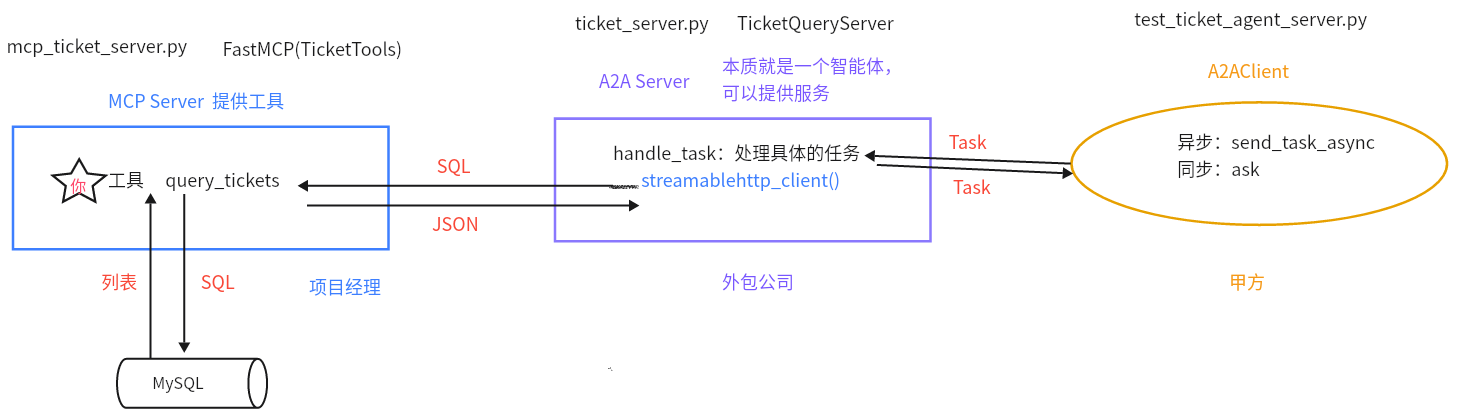
调用链

image-20251029105652321

==位置==:SmartVoyage/mcp_server/mcp_ticket_server.py

1
2
3
4
5
6
7
8
9
10
11
12
13
14
15
16
17
18
19
20
21
22
23
24
25
26
27
28
29
30
31
32
33
34
35
36
37
38
39
40
41
42
43
44
45
46
47
48
49
50
51
52
53
54
55
56
57
58
59
60
61
62
63
64
65
66
67
68
69
70
71
72
73
74
75
76
77
78
79
80
81
82
83
84
85
86
87
88
89
90
91
92
93
94
95
96
97
98
99
100
101
102
103
104
105
106
107
108
109
110
111
112
113
114
115
116
117
118
119
120
121
122
123
124
125
126
127
128
129
130
131
132
133
134
135
136
137
138
139
140
141
142
143
144
145
146
147
148
149
150
151
152
153
154
155
156
157
158
159
160
161
162
163
164
165
166
167
168
169
170
171
172
173
174
175
176
177
178
179
180
181
182
183
184
185
186
187
188
189
190
191
192
193
194
195
196
197
198
199
200
201
202
203
204
205
206
207
208
209
210
211
212
213
214
215
216
217
218
219
220
221
222
223
224
225
226
227
228
229
230
231
232
233
234
235
236
237
238
239
240
241
242
243
244
245
246
247
248
249
250
251
252
253
254
255
256
257
258
259
260
261
262
263
264
265
266
267
268
269
270
271
272
273
274
275
276
277
278
279
280
281
282
283
284
285
286
287
288
289
290
291
292
293
294
295
296
297
298
299
300
301
302
303
import json
import asyncio

from mcp import ClientSession
from mcp.client.streamable_http import streamablehttp_client
from python_a2a import A2AServer, run_server, AgentCard, AgentSkill, TaskStatus, TaskState, Message, TextContent, \
MessageRole, Task
from langchain_openai import ChatOpenAI
from langchain_core.prompts import ChatPromptTemplate
from datetime import datetime
import pytz

from SmartVoyage.config import Config
from SmartVoyage.create_logger import logger

conf = Config()

# 初始化LLM
llm = ChatOpenAI(
model=conf.model_name,
base_url=conf.base_url,
api_key=conf.api_key,
temperature=0.1
)


# 数据表 schema
table_schema_string = """ # 定义票务表SQL schema字符串,用于Prompt上下文
CREATE TABLE train_tickets (
id INT AUTO_INCREMENT PRIMARY KEY COMMENT '主键,自增,唯一标识每条记录',
departure_city VARCHAR(50) CHARACTER SET utf8mb4 COLLATE utf8mb4_unicode_ci NOT NULL COMMENT '出发城市(如“北京”)',
arrival_city VARCHAR(50) CHARACTER SET utf8mb4 COLLATE utf8mb4_unicode_ci NOT NULL COMMENT '到达城市(如“上海”)',
departure_time DATETIME NOT NULL COMMENT '出发时间(如“2025-08-12 07:00:00”)',
arrival_time DATETIME NOT NULL COMMENT '到达时间(如“2025-08-12 11:30:00”)',
train_number VARCHAR(20) NOT NULL COMMENT '火车车次(如“G1001”)',
seat_type VARCHAR(20) CHARACTER SET utf8mb4 COLLATE utf8mb4_unicode_ci NOT NULL COMMENT '座位类型(如“二等座”)',
total_seats INT NOT NULL COMMENT '总座位数(如 1000)',
remaining_seats INT NOT NULL COMMENT '剩余座位数(如 50)',
price DECIMAL(10, 2) NOT NULL COMMENT '票价(如 553.50)',
created_at TIMESTAMP DEFAULT CURRENT_TIMESTAMP COMMENT '创建时间,自动记录插入时间',
UNIQUE KEY unique_train (departure_time, train_number)
) COMMENT='火车票信息表';

-- 机票表
CREATE TABLE flight_tickets (
id INT AUTO_INCREMENT PRIMARY KEY COMMENT '主键,自增,唯一标识每条记录',
departure_city VARCHAR(50) CHARACTER SET utf8mb4 COLLATE utf8mb4_unicode_ci NOT NULL COMMENT '出发城市(如“北京”)',
arrival_city VARCHAR(50) CHARACTER SET utf8mb4 COLLATE utf8mb4_unicode_ci NOT NULL COMMENT '到达城市(如“上海”)',
departure_time DATETIME NOT NULL COMMENT '出发时间(如“2025-08-12 08:00:00”)',
arrival_time DATETIME NOT NULL COMMENT '到达时间(如“2025-08-12 10:30:00”)',
flight_number VARCHAR(20) NOT NULL COMMENT '航班号(如“CA1234”)',
cabin_type VARCHAR(20) CHARACTER SET utf8mb4 COLLATE utf8mb4_unicode_ci NOT NULL COMMENT '舱位类型(如“经济舱”)',
total_seats INT NOT NULL COMMENT '总座位数(如 200)',
remaining_seats INT NOT NULL COMMENT '剩余座位数(如 10)',
price DECIMAL(10, 2) NOT NULL COMMENT '票价(如 1200.00)',
created_at TIMESTAMP DEFAULT CURRENT_TIMESTAMP COMMENT '创建时间,自动记录插入时间',
UNIQUE KEY unique_flight (departure_time, flight_number)
) COMMENT='航班机票信息表';

-- 演唱会票表
CREATE TABLE concert_tickets (
id INT AUTO_INCREMENT PRIMARY KEY COMMENT '主键,自增,唯一标识每条记录',
artist VARCHAR(100) CHARACTER SET utf8mb4 COLLATE utf8mb4_unicode_ci NOT NULL COMMENT '艺人名称(如“周杰伦”)',
city VARCHAR(50) CHARACTER SET utf8mb4 COLLATE utf8mb4_unicode_ci NOT NULL COMMENT '举办城市(如“上海”)',
venue VARCHAR(100) CHARACTER SET utf8mb4 COLLATE utf8mb4_unicode_ci NOT NULL COMMENT '场馆(如“上海体育场”)',
start_time DATETIME NOT NULL COMMENT '开始时间(如“2025-08-12 19:00:00”)',
end_time DATETIME NOT NULL COMMENT '结束时间(如“2025-08-12 22:00:00”)',
ticket_type VARCHAR(20) CHARACTER SET utf8mb4 COLLATE utf8mb4_unicode_ci NOT NULL COMMENT '票类型(如“VIP”)',
total_seats INT NOT NULL COMMENT '总座位数(如 5000)',
remaining_seats INT NOT NULL COMMENT '剩余座位数(如 100)',
price DECIMAL(10, 2) NOT NULL COMMENT '票价(如 880.00)',
created_at TIMESTAMP DEFAULT CURRENT_TIMESTAMP COMMENT '创建时间,自动记录插入时间',
UNIQUE KEY unique_concert (start_time, artist, ticket_type)
) COMMENT='演唱会门票信息表';
"""

# 生成SQL的提示词
sql_prompt = ChatPromptTemplate.from_template(
"""
系统提示:你是一个专业的票务SQL生成器,需要从对话历史(含用户的问题)中提取用户的意图以及关键信息,然后基于train_tickets、flight_tickets、concert_tickets表生成SELECT语句。
根据对话历史:
1. 提取用户的意图,意图有3种(train: 火车/高铁, flight: 机票, concert: 演唱会),输出:{{"type": "train/flight/concert"}};如果无法识别意图,或者意图不在这3种内,则模仿最后1个示例回复即可。
2. 根据用户的意图,生成对应表的 SELECT 语句,仅查询指定字段:
- train_tickets: id, departure_city, arrival_city, departure_time, arrival_time, train_number, seat_type, price, remaining_seats
- flight_tickets: id, departure_city, arrival_city, departure_time, arrival_time, flight_number, cabin_type, price, remaining_seats
- concert_tickets: id, artist, city, venue, start_time, end_time, ticket_type, price, remaining_seats
3. 如果用户在查询票务信息时,缺少必要信息,则输出:{{"status": "input_required", "message": "请提供票务类型(如火车票、机票、演唱会)和必要信息(如城市、日期)。"}} ,如示例所示;如果对话历史中信息齐全,则输出纯SQL即可。
其中,每种意图必要的信息有:
- flight/train: departure_city (出发城市), arrival_city (到达城市), date (日期)。
- concert: city (城市), artist (艺人), date (日期)。
4. 按要求输出两行数据或一行数据即可,不需要输出其他内容。


示例:
- 对话: user: 火车票 北京 上海 2025-07-31 硬卧
输出:
{{"type": "train"}}
SELECT id, departure_city, arrival_city, departure_time, arrival_time, train_number, seat_type, price, remaining_seats FROM train_tickets WHERE departure_city = '北京' AND arrival_city = '上海' AND DATE(departure_time) = '2025-07-31' AND seat_type = '硬卧'

- 对话: user: 机票 上海 广州 2025-09-11 头等舱
输出:
{{"type": "flight"}}
SELECT id, departure_city, arrival_city, departure_time, arrival_time, flight_number, cabin_type, price, remaining_seats FROM flight_tickets WHERE departure_city = '上海' AND arrival_city = '广州' AND DATE(departure_time) = '2025-09-11' AND cabin_type = '头等舱'

- 对话: user: 演唱会 北京 刀郎 2025-08-23 看台
输出:
{{"type": "concert"}}
SELECT id, artist, city, venue, start_time, end_time, ticket_type, price, remaining_seats FROM concert_tickets WHERE city = '北京' AND artist = '刀郎' AND DATE(start_time) = '2025-08-23' AND ticket_type = '看台'

- 对话: user: 火车票
输出:
{{"status": "input_required", "message": "请提供票务类型(如火车票、机票、演唱会)和必要信息(如城市、日期)。"}}

- 对话: user: 你好
输出:
{{"status": "input_required", "message": "请提供票务类型(如火车票、机票、演唱会)和必要信息(如城市、日期)。"}}

表结构:{table_schema_string}
对话历史: {conversation}
当前日期: {current_date} (Asia/Shanghai)
"""
)

# 定义查询函数
async def get_ticket_info(sql):
try:
# 启动 MCP server,通过streamable建立连接
async with streamablehttp_client("http://127.0.0.1:8001/mcp") as (read, write, _):
# 使用读写通道创建 MCP 会话
async with ClientSession(read, write) as session:
try:
await session.initialize()
# 工具调用
result = await session.call_tool("query_tickets", {"sql": sql})
result_data = json.loads(result) if isinstance(result, str) else result
logger.info(f"票务查询结果:{result_data}")
return result_data.content[0].text
except Exception as e:
logger.error(f"票务 MCP 测试出错:{str(e)}")
return {"status": "error", "message": f"票务 MCP 查询出错:{str(e)}"}
except Exception as e:
logger.error(f"连接或会话初始化时发生错误: {e}")
return {"status": "error", "message": "连接或会话初始化时发生错误"}

# Agent 卡片定义
agent_card = AgentCard(
name="TicketQueryAssistant",
description="基于 LangChain 提供票务查询服务的助手",
url="http://localhost:5006",
version="1.0.4",
capabilities={"streaming": True, "memory": True},
skills=[
AgentSkill(
name="execute ticket query",
description="根据客户端提供的输入执行票务查询,返回数据库结果,支持自然语言输入",
examples=["火车票 北京 上海 2025-07-31 硬卧", "机票 北京 上海 2025-07-31 经济舱",
"演唱会 北京 刀郎 2025-08-23 看台"]
)
]
)


# 票务查询服务器类
class TicketQueryServer(A2AServer):
def __init__(self):
super().__init__(agent_card=agent_card)
self.llm = llm
self.sql_prompt = sql_prompt
self.schema = table_schema_string

# 定义生成SQL查询方法,输入对话历史,返回SQL或追问JSON
def generate_sql_query(self, conversation: str) -> dict:
try:
# 组装链
chain = self.sql_prompt | self.llm
# 调用链
current_date = datetime.now(pytz.timezone('Asia/Shanghai')).strftime('%Y-%m-%d') # 获取当前日期,格式化为字符串
output = chain.invoke({"conversation": conversation, "current_date": current_date, "table_schema_string": self.schema}).content.strip()
logger.info(f"原始 LLM 输出: {output}")

# 处理 LLM 输出
# 处理结果,返回字典
lines = output.split('\n')
type_line = lines[0].strip()
if type_line.startswith('```json'): # 检查是否以```json开头
type_line = lines[1].strip() # 取下一行为类型行
sql_lines = lines[3:-1] if lines[-1].strip() == '```' else lines[3:] # 提取SQL行,跳过代码块标记
else:
sql_lines = lines[1:] if len(lines) > 1 else [] # 取剩余行为SQL行

# 提取 type 和 SQL
if type_line.startswith('{"type":'): # 如果以{"type":开头
query_type = json.loads(type_line)["type"] # 解析并提取类型
sql_query = ' '.join([line.strip() for line in sql_lines if
line.strip() and not line.startswith('```')]) # 连接SQL行,过滤空行和代码块
logger.info(f"分类类型: {query_type}, 生成的 SQL: {sql_query}")
return {"status": "sql", "type": query_type, "sql": sql_query} # 返回SQL状态字典,包括类型
elif type_line.startswith('{"status": "input_required"'): # 检查是否为追问JSON
return json.loads(type_line)
else: # 无效格式
logger.error(f"无效的 LLM 输出格式: {output}")
return {"status": "input_required", "message": "无法解析查询类型或SQL,请提供更明确的信息。"} # 返回默认追问

except Exception as e:
logger.error(f"SQL 生成失败: {str(e)}")
return {"status": "input_required", "message": "查询无效,请提供查询票务的相关信息。"} # 返回追问JSON


# 处理任务:提取输入,生成SQL,调用MCP,格式化结果
def handle_task(self, task):
# 1 提取输入
content = (task.message or {}).get("content", {}) # 从消息中获取内容
# 提取conversation,即客户端发起的任务中的query语句
conversation = content.get("text", "") if isinstance(content, dict) else ""
logger.info(f"对话历史及用户问题: {conversation}")

try:
# 2 基于用户问题生成SQL查询
gen_result = self.generate_sql_query(conversation)
# 检查是否需要追问,如果是则添加追问消息后返回任务
if gen_result["status"] == "input_required":
task.status = TaskStatus(state=TaskState.INPUT_REQUIRED,
message={"role": "agent", "content": {"text": gen_result["message"]}})
return task

# 否则则提取SQL查询,并进行MCP调用
sql_query = gen_result["sql"]
query_type = gen_result["type"]
logger.info(f"执行 SQL 查询: {sql_query} (类型: {query_type})")

# 3 调用MCP
ticket_result = asyncio.run(get_ticket_info(sql_query))

# 4 格式化结果
response = json.loads(ticket_result) if isinstance(ticket_result, str) else ticket_result
logger.info(f"MCP 返回: {response}")

# 检查响应状态
if response.get("status") == "success":
data = response.get("data", []) # 提取数据列表
response_text = "" # 初始化响应文本
for d in data: # 遍历每个数据项
if query_type == "train": # 火车票类型
response_text += f"{d['departure_city']}{d['arrival_city']} {d['departure_time']}: 车次 {d['train_number']}{d['seat_type']},票价 {d['price']}元,剩余 {d['remaining_seats']} 张\n" # 格式化火车票文本
elif query_type == "flight": # 机票类型
response_text += f"{d['departure_city']}{d['arrival_city']} {d['departure_time']}: 航班 {d['flight_number']}{d['cabin_type']},票价 {d['price']}元,剩余 {d['remaining_seats']} 张\n" # 格式化机票文本
elif query_type == "concert": # 演唱会类型
response_text += f"{d['city']} {d['start_time']}: {d['artist']} 演唱会,{d['ticket_type']},场地 {d['venue']},票价 {d['price']}元,剩余 {d['remaining_seats']} 张\n" # 格式化演唱会文本
if not response_text: # 检查文本是否为空
response_text = "无结果。如果需要其他日期,请补充。"

# 设置任务产物为文本部分,并设置任务状态为完成
task.artifacts = [{"parts": [{"type": "text", "text": response_text}]}]
task.status = TaskStatus(state=TaskState.COMPLETED)
elif response.get("status") == "no_data":
response_text = response.get("message", "请输出查询票务的详细信息。")

# 设置任务状态为输入所需,添加追问消息
task.status = TaskStatus(state=TaskState.INPUT_REQUIRED,
message={"role": "agent", "content": {"text": response_text}})
else:
response_text = response.get("message", "查询失败,请重试或提供更多细节。")

# 设置任务状态为失败,添加错误信息
task.status = TaskStatus(state=TaskState.FAILED,
message={"role": "agent", "content": {"text": response_text}})
return task


except Exception as e: # 捕获异常
logger.error(f"查询失败: {str(e)}")

# 设置任务状态为失败,添加错误信息
task.status = TaskStatus(state=TaskState.FAILED,
message={"role": "agent", "content": {"text": f"查询失败: {str(e)} 请重试或提供更多细节。"}})
return task


if __name__ == "__main__":
# 测试 generate_sql_query
# server = TicketQueryServer()
# server.generate_sql_query("火车票 从北京到上海 2025-11-01")

# 测试 handle_task
# server = TicketQueryServer()
# message = Message(content=TextContent(text="火车票 从北京到上海 2025-11-01"), role=MessageRole.USER)
# # Task中存储和封装Message
# task = Task(message=message.to_dict())
# server.handle_task(task)

# 创建并运行服务器
# 实例化票务查询服务器
ticket_server = TicketQueryServer()
# 打印服务器信息
print("\n=== 服务器信息 ===")
print(f"名称: {ticket_server.agent_card.name}")
print(f"描述: {ticket_server.agent_card.description}")
print("\n技能:")
for skill in ticket_server.agent_card.skills:
print(f"- {skill.name}: {skill.description}")
# 运行服务器
run_server(ticket_server, host="127.0.0.1", port=5006)

11 订票Agent服务器【掌握】

order_server.py:订票代理服务器,首先根据用户的意图去调用票务Agent服务器查询余票信息,然后进行调用订票MCP服务器完成订票。

位置:SmartVoyage/a2a_server/order_server.py

1
2
3
4
5
6
7
8
9
10
11
12
13
14
15
16
17
18
19
20
21
22
23
24
25
26
27
28
29
30
31
32
33
34
35
36
37
38
39
40
41
42
43
44
45
46
47
48
49
50
51
52
53
54
55
56
57
58
59
60
61
62
63
64
65
66
67
68
69
70
71
72
73
74
75
76
77
78
79
80
81
82
83
84
85
86
87
88
89
90
91
92
93
94
95
96
97
98
99
100
101
102
103
104
105
106
107
108
109
110
111
112
113
114
115
116
117
118
119
120
121
122
123
124
125
126
127
128
129
130
131
132
133
134
135
136
137
138
139
140
141
142
143
144
145
146
147
148
149
150
151
152
153
154
155
156
157
158
159
160
161
162
163
164
import asyncio
import uuid

from langchain_openai import ChatOpenAI
from mcp import ClientSession
from mcp.client.streamable_http import streamablehttp_client
from langchain_mcp_adapters.tools import load_mcp_tools
from langchain.agents import create_tool_calling_agent, AgentExecutor
from langchain_core.prompts import ChatPromptTemplate
from python_a2a import AgentCard, AgentSkill, run_server, TaskStatus, TaskState, A2AServer, A2AClient, Message, \
TextContent, MessageRole, Task

from SmartVoyage.create_logger import logger
from agent_learn.config import Config

conf = Config()

# 初始化LLM
llm = ChatOpenAI(
model=conf.model_name,
base_url=conf.base_url,
api_key=conf.api_key,
temperature=0.1
)

# 定义查询函数
async def order_tickets(query):
try:
# 启动 MCP server,通过streamable建立连接
async with streamablehttp_client("http://127.0.0.1:8003/mcp") as (read, write, _):
# 使用读写通道创建 MCP 会话
async with ClientSession(read, write) as session:
try:
await session.initialize()

# 从 session 自动获取 MCP server 提供的工具列表。
tools = await load_mcp_tools(session)
# print(f"tools-->{tools}")

# 创建 agent 的提示模板
prompt = ChatPromptTemplate.from_messages([
("system",
"你是一个票务预定助手,能够调用工具来完成火车票、飞机票或演出票的预定。你需要仔细分析工具需要的参数,然后从用户提供的信息中提取信息。如果用户提供的信息不足以提取到调用工具所有必要参数,则向用户追问,以获取该信息。不能自己编撰参数。"),
("human", "{input}"),
("placeholder", "{agent_scratchpad}"),
])

# 构建工具调用代理
agent = create_tool_calling_agent(llm, tools, prompt)

# 创建代理执行器
agent_executor = AgentExecutor(agent=agent, tools=tools, verbose=True)

# 代理调用
response = await agent_executor.ainvoke({"input": query})

return {"status": "success", "message": f"{response['output']}"}
except Exception as e:
logger.error(f"票务 MCP 测试出错:{str(e)}")
return {"status": "error", "message": f"票务 MCP 查询出错:{str(e)}"}
except Exception as e:
logger.error(f"连接或会话初始化时发生错误: {e}")
return {"status": "error", "message": "连接或会话初始化时发生错误"}

# Agent 卡片定义
agent_card = AgentCard(
name="TicketOrderAssistant",
description="通过MCP提供票务预定服务的助手",
url="http://localhost:5007",
version="1.0.4",
capabilities={"streaming": True, "memory": True},
skills=[
AgentSkill(
name="execute ticket order",
description="根据客户端提供的输入执行票务预定,返回执行结果",
examples=["北京 到 上海 2025-11-15 火车票 二等座 1张",
"上海 到 北京 2025-12-11 飞机票 公务舱 2张"]
)
]
)


# 票务预定服务器类
class TicketOrderServer(A2AServer):
def __init__(self):
super().__init__(agent_card=agent_card)
self.llm = llm
self.ticket_client = A2AClient("http://localhost:5006")

# 处理任务:提取输入,查询余票,调用MCP,结果输出
def handle_task(self, task):
# 1 提取输入
content = (task.message or {}).get("content", {}) # 从消息中获取内容
# 提取conversation,即客户端发起的任务中的query语句
conversation = content.get("text", "") if isinstance(content, dict) else ""
logger.info(f"对话历史及用户问题: {conversation}")

try:
# 2 调用票务查询agent查询余票
message_ticket = Message(content=TextContent(text=conversation), role=MessageRole.USER)
task_ticket = Task(id="task-" + str(uuid.uuid4()), message=message_ticket.to_dict())

# 发送任务并获取最终结果
ticket_result_task = asyncio.run(self.ticket_client.send_task_async(task_ticket))
logger.info(f"原始响应: {ticket_result_task}")

# 处理结果:未查到余票信息时,则返回提示信息
if ticket_result_task.status.state != 'completed':
required_message = ticket_result_task.status.message['content']['text']
logger.info(f'余票未查到:{required_message}')
task.status = TaskStatus(state=TaskState.INPUT_REQUIRED,
message={"role": "agent", "content": {"text": required_message}})
return task
# 处理结果:查到余票信息时,进行订票
ticket_result = ticket_result_task.artifacts[0]["parts"][0]["text"]
logger.info(f"余票信息: {ticket_result}")

# 3 调用MCP订票
order_result = asyncio.run(order_tickets(conversation + '\n余票信息:' + ticket_result))
logger.info(f"MCP 返回: {order_result}")

# 4 结果输出
data = order_result.get("message", '')
logger.info(f"订票结果: {data}")
# 检查响应状态
if order_result.get("status") == "success":
result = '余票信息:' + ticket_result + '\n订票结果:' + data
# 设置任务产物为文本部分,并设置任务状态为完成
task.artifacts = [{"parts": [{"type": "text", "text": result}]}]
task.status = TaskStatus(state=TaskState.COMPLETED)
else:
# 设置任务状态为失败,添加错误信息
task.status = TaskStatus(state=TaskState.FAILED,
message={"role": "agent", "content": {"text": data}})
return task

except Exception as e: # 捕获异常
logger.error(f"查询失败: {str(e)}")

# 设置任务状态为失败,添加错误信息
task.status = TaskStatus(state=TaskState.FAILED,
message={"role": "agent", "content": {"text": f"查询失败: {str(e)} 请重试或提供更多细节。"}})
return task


if __name__ == '__main__':
# 测试handle_task
# server = TicketOrderServer()
# message = Message(content=TextContent(text="火车票 从北京到上海 2025-10-22"), role=MessageRole.USER)
# task = Task(message=message.to_dict())
# server.handle_task(task)

# 创建并运行服务器
# 实例化票务查询服务器
ticket_server = TicketOrderServer()
# 打印服务器信息
print("\n=== 服务器信息 ===")
print(f"名称: {ticket_server.agent_card.name}")
print(f"描述: {ticket_server.agent_card.description}")
print("\n技能:")
for skill in ticket_server.agent_card.skills:
print(f"- {skill.name}: {skill.description}")
# 运行服务器
run_server(ticket_server, host="127.0.0.1", port=5007)

12 main主程序【掌握】

提示词:

位置:SmartVoyage/main_prompts.py

1
2
3
4
5
6
7
8
9
10
11
12
13
14
15
16
17
18
19
20
21
22
23
24
25
26
27
28
29
30
31
32
33
34
35
36
37
38
39
40
41
42
43
44
45
46
47
48
49
50
51
52
53
54
55
56
57
58
59
60
61
62
63
64
65
66
67
68
69
70
71
72
73
74
75
76
77
78
79
80
from langchain_core.prompts import ChatPromptTemplate


class SmartVoyagePrompts:

# 定义意图识别提示模板
@staticmethod
def intent_prompt():
return ChatPromptTemplate.from_template(
"""
系统提示:您是一个专业的旅行意图识别专家,基于用户查询和对话历史,识别其意图,用于调用专门的agent server来执行;为方便后续的agent server处理,可以基于对话历史对用户查询进行改写,使问题更明确。严格遵守规则:
- 支持意图:['weather' (天气查询), 'flight' (机票查询), 'train' (高铁/火车票查询), 'order' (票务预定), 'concert' (演唱会票查询), 'attraction' (景点推荐)] 或其组合(如 ['weather', 'flight'])。如果意图超出范围,返回意图 'out_of_scope'。
- 注意票务预定和票务查询要区分开,涉及到订票时则为order,只是查询则为flight、train或concert。
- 如果意图为 'out_of_scope'时,此时不需要再进行查询改写,你可以直接根据用户问题进行回复,将回复答案写到follow_up_message中即可。
- 在进行用户查询改写时,不要回答其问题,也不要修改其原意,只需要将对话历史中跟该查询相关的上下文信息取出来,然后整合到一起,使用户查询更明确即可。注意:要仔细分析上下文信息,不要进行过度整合。如果用户查询跟对话历史无关,则不需要考虑历史对话,直接进行查询改写即可。将改写后的问题存储到user_queries。
- 如果用户的意图很不明确或者有歧义,可以向其进行追问,将追问问题填充到follow_up_message中。
- 输出严格为JSON:{{"intents": ["intent1", "intent2"], "user_queries": {{"intent1": "user_query1", "intent2": "user_query2"}}, "follow_up_message": "追问消息"}}。不要添加额外文本!

输出示例:
{{"intents": ["weather"], "user_queries": {{"weather": "今天北京天气如何"}}, "follow_up_message": ""}}
{{"intents": ["weather"], "user_queries": {{}}, "follow_up_message": "你问的是今天北京天气状况吗"}}
{{"intents": ["weather", "flight"], "user_queries": {{"weather": "今天北京天气如何", "flight": "查询一下10月28日,从北京飞往杭州的机票"}}, "follow_up_message": ""}}
{{"intents": ["out_of_scope"], "user_queries": {{}}, "follow_up_message": "你好,我是智能旅行助手,欢迎提问旅行方面的问题。"}}

当前日期:{current_date} (Asia/Shanghai)。
对话历史:{conversation_history}
用户查询:{query}
""")

# 定义天气结果总结提示模板,用于LLM总结天气查询的原始响应
@staticmethod
def summarize_weather_prompt():
return ChatPromptTemplate.from_template(
"""
系统提示:您是一位专业的天气预报员,以生动、准确的风格总结天气信息。基于查询和结果:
- 核心描述点:城市、日期、温度范围、天气描述、湿度、风向、降水等。
- 如果结果为空或者意思为需要补充数据,则委婉提示“未找到数据,请确认城市/日期”
- 语气:专业预报,如“根据最新数据,北京2025-07-31的天气预报为...”。
- 保持中文,100-150字。
- 如果查询无关,返回“请提供天气相关查询。”

查询:{query}
结果:{raw_response}
""")

# 定义票务结果总结提示模板,用于LLM总结票务查询的原始响应
@staticmethod
def summarize_ticket_prompt():
return ChatPromptTemplate.from_template(
"""
系统提示:您是一位专业的旅行顾问,以热情、精确的风格总结票务信息。基于查询和结果:
- 核心描述点:出发/到达、时间、类型、价格、剩余座位等。
- 如果结果为空或者意思为需要补充数据,则委婉提示“未找到数据,请确认或修改条件”
- 语气:顾问式,如“为您推荐北京到上海的机票选项...”。
- 保持中文,100-150字。
- 如果查询无关,返回“请提供票务相关查询。”


查询:{query}
结果:{raw_response}
""")

# 定义景点推荐提示模板,用于LLM直接生成景点推荐内容
@staticmethod
def attraction_prompt():
return ChatPromptTemplate.from_template(
"""
系统提示:您是一位旅行专家,基于用户查询生成景点推荐。规则:
- 推荐3-5个景点,包含描述、理由、注意事项。
- 基于槽位:城市、偏好。
- 语气:热情推荐,如“推荐您在北京探索故宫...”。
- 备注:内容生成,仅供参考。
- 保持中文,150-250字。

查询:{query}
""")


if __name__ == '__main__':
print(SmartVoyagePrompts.intent_prompt())

意图识别:

1
2
3
4
5
6
7
8
9
10
11
12
13
14
15
16
17
18
19
20
21
22
23
24
25
26
27
28
29
30
31
# 意图识别agent
def intent_agent(user_input):
'''
意图识别agent:实现意图的分类以及问题的改写
:param user_input: 用户的原始问题
:return: intents 用户意图, user_queries 改写后的问题, follow_up_message 追问的问题
'''
global conversation_history, llm

# 创建意图识别链:提示模板 + LLM
chain = SmartVoyagePrompts.intent_prompt() | llm

# 调用LLM进行意图识别
current_date = datetime.now(pytz.timezone('Asia/Shanghai')).strftime('%Y-%m-%d') # 获取当前日期(Asia/Shanghai时区)
intent_response = chain.invoke(
{"conversation_history": conversation_history, "query": user_input,
"current_date": current_date}).content.strip()
logger.info(f"意图识别原始响应: {intent_response}")

# 处理意图识别结果
# 清理响应:移除可能的Markdown代码块标记
intent_response = re.sub(r'^```json\s*|\s*```$', '', intent_response).strip()
logger.info(f"清理后响应: {intent_response}")
intent_output = json.loads(intent_response)
# 提取意图、改写问题和追问消息
intents = intent_output.get("intents", [])
user_queries = intent_output.get("user_queries", {})
follow_up_message = intent_output.get("follow_up_message", "")
logger.info(f"intents: {intents}||user_queries: {user_queries}||follow_up_message: {follow_up_message} ")

return intents, user_queries, follow_up_message

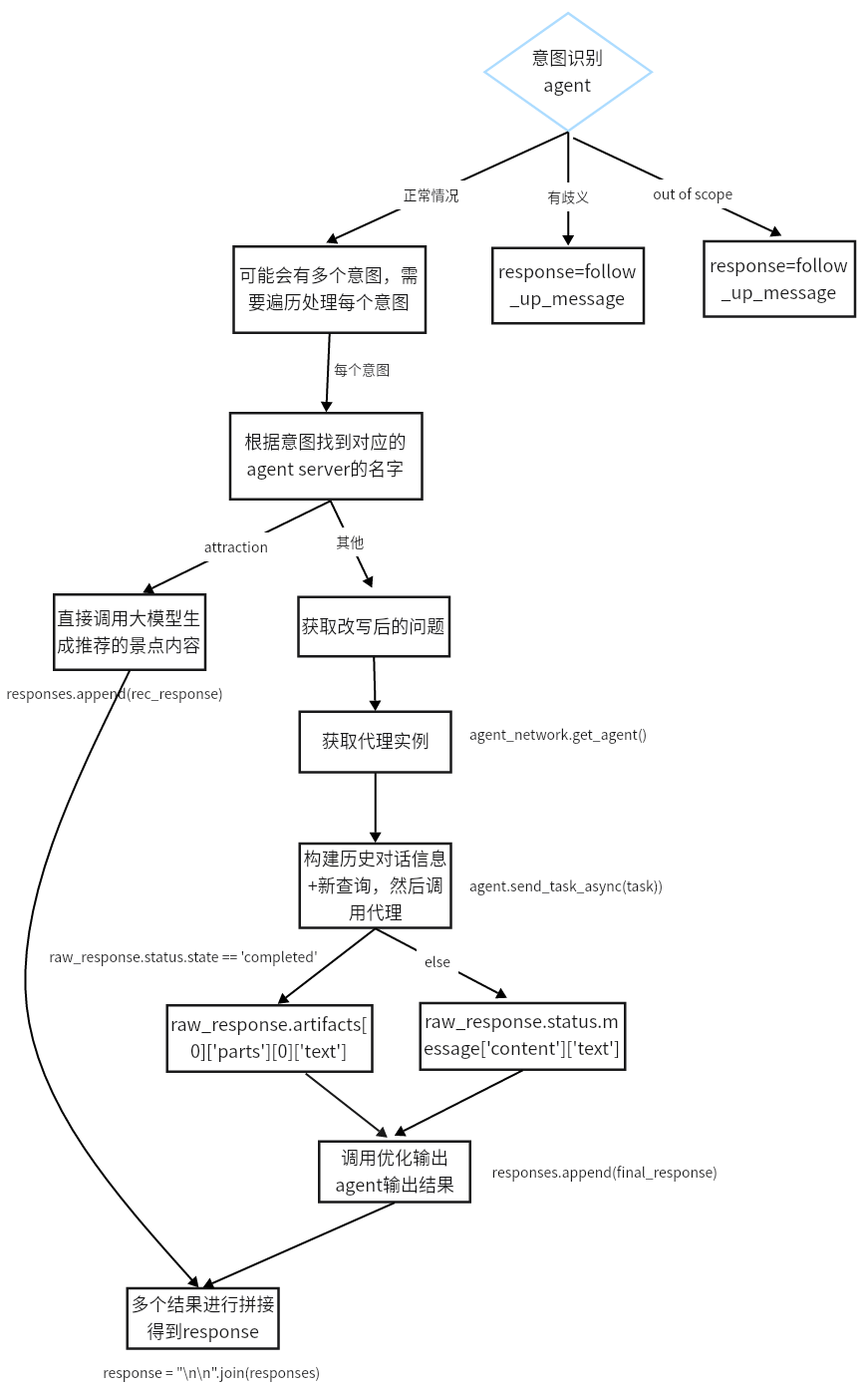
不同意图的处理流程:

位置:SmartVoyage/main.py

image-20251029155622597

完整代码:

1
2
3
4
5
6
7
8
9
10
11
12
13
14
15
16
17
18
19
20
21
22
23
24
25
26
27
28
29
30
31
32
33
34
35
36
37
38
39
40
41
42
43
44
45
46
47
48
49
50
51
52
53
54
55
56
57
58
59
60
61
62
63
64
65
66
67
68
69
70
71
72
73
74
75
76
77
78
79
80
81
82
83
84
85
86
87
88
89
90
91
92
93
94
95
96
97
98
99
100
101
102
103
104
105
106
107
108
109
110
111
112
113
114
115
116
117
118
119
120
121
122
123
124
125
126
127
128
129
130
131
132
133
134
135
136
137
138
139
140
141
142
143
144
145
146
147
148
149
150
151
152
153
154
155
156
157
158
159
160
161
162
163
164
165
166
167
168
169
170
171
172
173
174
175
176
177
178
179
180
181
182
183
184
185
186
187
188
189
190
191
192
193
194
195
196
197
198
199
200
201
202
203
204
205
206
207
208
209
210
211
212
213
214
215
216
217
218
219
220
221
222
223
224
225
226
227
228
229
230
231
232
233
234
235
236
237
238
239
240
241
242
243
import asyncio
import json
import uuid
from datetime import datetime
import pytz
import re
from python_a2a import AgentNetwork, TextContent, Message, MessageRole, Task
from langchain_openai import ChatOpenAI

from SmartVoyage.config import Config
from SmartVoyage.create_logger import logger
from SmartVoyage.main_prompts import SmartVoyagePrompts

conf = Config()

# 初始化全局变量,用于模拟会话状态 这些变量替换了Streamlit的session_state
messages = [] # 存储对话历史消息列表,每个元素为字典{"role": "user/assistant", "content": "消息内容"}
agent_network = None # 代理网络实例
llm = None # 大语言模型实例
agent_urls = {} # 存储代理的URL信息字典
conversation_history = "" # 存储整个对话历史字符串,用于意图识别


# 初始化代理网络和相关组件 此部分在脚本启动时执行一次,模拟Streamlit的初始化
def initialize_system():
"""
初始化系统组件,包括代理网络、路由器、LLM和会话状态
核心逻辑:构建AgentNetwork,添加代理,创建路由器和LLM
"""
global agent_network, llm, agent_urls, conversation_history
# 存储代理URL信息,便于查看
agent_urls = {
"WeatherQueryAssistant": "http://localhost:5005", # 天气代理URL
"TicketQueryAssistant": "http://localhost:5006", # 票务代理URL
"TicketOrderAssistant": "http://localhost:5007" # 票务预定代理URL
}
# 创建代理网络
network = AgentNetwork(name="旅行助手网络")
network.add("WeatherQueryAssistant", "http://localhost:5005")
network.add("TicketQueryAssistant", "http://localhost:5006")
network.add("TicketOrderAssistant", "http://localhost:5007")
agent_network = network

# 加载配置并创建LLM
llm = ChatOpenAI(
model=conf.model_name,
api_key=conf.api_key,
base_url=conf.base_url,
temperature=0.1
)

# 初始化对话历史为空字符串
conversation_history = ""

# 意图识别agent
def intent_agent(user_input):
'''
意图识别agent:实现意图的分类以及问题的改写
:param user_input: 用户的原始问题
:return: intents 用户意图, user_queries 改写后的问题, follow_up_message 追问的问题
'''
global conversation_history, llm

# 创建意图识别链:提示模板 + LLM
chain = SmartVoyagePrompts.intent_prompt() | llm

# 调用LLM进行意图识别
current_date = datetime.now(pytz.timezone('Asia/Shanghai')).strftime('%Y-%m-%d') # 获取当前日期(Asia/Shanghai时区)
intent_response = chain.invoke(
{"conversation_history": '\n'.join(conversation_history.split("\n")[-6:]), "query": user_input,
"current_date": current_date}).content.strip()
logger.info(f"意图识别原始响应: {intent_response}")

# 处理意图识别结果
# 清理响应:移除可能的Markdown代码块标记
intent_response = re.sub(r'^```json\s*|\s*```$', '', intent_response).strip()
logger.info(f"清理后响应: {intent_response}")
intent_output = json.loads(intent_response)
# 提取意图、改写问题和追问消息
intents = intent_output.get("intents", [])
user_queries = intent_output.get("user_queries", {})
follow_up_message = intent_output.get("follow_up_message", "")
logger.info(f"intents: {intents}||user_queries: {user_queries}||follow_up_message: {follow_up_message} ")

return intents, user_queries, follow_up_message


# 处理用户输入的核心函数
# 此函数模拟Streamlit的输入处理逻辑,包括意图识别、路由和响应生成
def process_user_input(prompt):
"""
处理用户输入:识别意图、调用代理、生成响应
核心逻辑:使用LLM进行意图识别,根据意图路由到相应代理或直接生成内容
"""
global messages, conversation_history, llm
# 添加用户消息到历史
messages.append({"role": "user", "content": prompt})
conversation_history += f"\nUser: {prompt}"

print("正在分析您的意图...")
try:
# 意图识别过程
intents, user_queries, follow_up_message = intent_agent(prompt)

# 根据意图输出生成响应
if "out_of_scope" in intents:
# 如果意图超出范围,返回大模型直接回复
response = follow_up_message
conversation_history += f"\nAssistant: {response}"
elif follow_up_message != "":
# 如果有追问消息,则直接返回
response = follow_up_message
conversation_history += f"\nAssistant: {response}" # 更新历史
else: # 处理有效意图
responses = [] # 存储每个意图的响应列表
routed_agents = [] # 记录路由到的代理列表
for intent in intents:
logger.info(f"处理意图:{intent}")
# 根据意图确定代理名称
if intent == "weather":
agent_name = "WeatherQueryAssistant"
elif intent in ["flight", "train", "concert"]:
agent_name = "TicketQueryAssistant"
elif intent == "order":
agent_name = "TicketOrderAssistant"
else:
agent_name = None

# 不同意图处理方式
if intent == "attraction":
# 对于景点推荐,直接使用LLM生成
chain = SmartVoyagePrompts.attraction_prompt() | llm
rec_response = chain.invoke({"query": prompt}).content.strip()
responses.append(rec_response)
elif agent_name:
# 对于代理意图,则调用代理
# 1)获取问题
query_str = user_queries.get(intent, {})
logger.info(f"{agent_name} 查询:{query_str}")
# 2)获取代理实例
agent = agent_network.get_agent(agent_name)
# 3)构建历史对话信息+新查询,然后调用代理
chat_history = '\n'.join(conversation_history.split("\n")[-7:-1]) + f'\nUser: {query_str}'
message = Message(content=TextContent(text=chat_history), role=MessageRole.USER)
task = Task(id="task-" + str(uuid.uuid4()), message=message.to_dict())
raw_response = asyncio.run(agent.send_task_async(task))
logger.info(f"{agent_name} 原始响应: {raw_response}") # 记录原始响应日志
# 4)处理结果
if raw_response.status.state == 'completed': # 正常结果
agent_result = raw_response.artifacts[0]['parts'][0]['text']
else: # 异常结果
agent_result = raw_response.status.message['content']['text']

# 根据代理类型总结响应
if agent_name == "WeatherQueryAssistant":
chain = SmartVoyagePrompts.summarize_weather_prompt() | llm
final_response = chain.invoke({"query": query_str, "raw_response": agent_result}).content.strip()
elif agent_name == "TicketQueryAssistant" :
chain = SmartVoyagePrompts.summarize_ticket_prompt() | llm
final_response = chain.invoke({"query": query_str, "raw_response": agent_result}).content.strip()
else:
final_response = agent_result

# 5)添加到历史
responses.append(final_response) # 添加到响应列表
routed_agents.append(agent_name) # 记录路由代理
else:
# 不支持的意图
responses.append("暂不支持此意图。")

# 组合所有响应
response = "\n\n".join(responses)
if routed_agents:
logger.info(f"路由到代理:{routed_agents}")
conversation_history += f"\nAssistant: {response}" # 更新历史

# 输出助手响应(模拟Streamlit的显示)
print(f"\n助手回复:\n{response}\n") # 打印响应
# 添加到消息历史
messages.append({"role": "assistant", "content": response})

except json.JSONDecodeError as json_err:
# 处理JSON解析错误
logger.error(f"意图识别JSON解析失败")
error_message = f"意图识别JSON解析失败:{str(json_err)}。请重试。"
print(f"\n助手回复:\n{error_message}\n") # 打印错误
messages.append({"role": "assistant", "content": error_message})
except Exception as e:
# 处理其他异常
logger.error(f"处理异常: {str(e)}")
error_message = f"处理失败:{str(e)}。请重试。"
print(f"\n助手回复:\n{error_message}\n") # 打印错误
messages.append({"role": "assistant", "content": error_message})


# 显示代理卡片信息
# 此函数模拟Streamlit的右侧Agent Card,打印代理详情
def display_agent_cards():
"""
显示所有代理的卡片信息,包括技能、描述、地址和状态
核心逻辑:遍历代理网络,获取并打印卡片内容
"""
print("\n🛠️ Agent Cards:")
for agent_name in agent_network.agents.keys():
# 获取代理卡片
agent_card = agent_network.get_agent_card(agent_name)
agent_url = agent_urls.get(agent_name, "未知地址")
print(f"\n--- Agent: {agent_name} ---")
print(f"技能: {agent_card.skills}")
print(f"描述: {agent_card.description}")
print(f"地址: {agent_url}")
print(f"状态: 在线") # 固定状态为在线

# 主函数:脚本入口
# 初始化系统并进入交互循环
if __name__ == "__main__":
# 初始化系统
initialize_system()
print("🤖 基于A2A的SmartVoyage旅行智能助手")
print("欢迎体验智能对话!输入问题,按回车提交;输入'quit'退出;输入'cards'查看代理卡片。")

# 显示初始代理卡片
display_agent_cards()

# 交互循环:模拟Streamlit的连续输入
while True:
# 获取用户输入
prompt = input("\n请输入您的问题: ").strip()
if prompt.lower() == 'quit':
print("感谢使用SmartVoyage!再见!")
break
elif prompt.lower() == 'cards': # 查看卡片条件
display_agent_cards() # 重新显示卡片
continue
elif not prompt: # 空输入跳过
continue
else:
# 处理输入
process_user_input(prompt) # 调用核心处理函数

# 脚本结束时打印页脚信息
print("\n---")
print("Powered by 黑马程序员 | 基于Agent2Agent的旅行助手系统 v2.0")